I hate it how we went from simple, to simpler to totally complicated regarding computer ports.
"Back in the days", it was a bunch of different ports of different sizes and shapes, and each thing had its own cable that fit into that thing only, and into only port only on the back of the pc. Yes, you needed 20 cables, but things were simple.
Then came the USB... one cable, one protocol for all.... except video (firewire) and storage (esata). Then even those got replaced by USB, as new usb standards made it faster.
And now? You buy a new laptop... usb-c charging, great. You need another charger, you go to the store, find a usb charger, buy it, plugi it in - everything fits - but it won't charge. You need a fast charger... back to the store, bring it home, doesn't charge. You need a PD charger and not a QC charger... store again, new charger... plug it in, doesn't charge. You need a PD charger, that goes up in voltage enough (20V) to charge. Store again, a new one... you plug it in... still nothing. Even though it fits in the hole, not all holes are equal, and you need to plug it into the correct usb port to charge the laptop. Yaay, everthing works! Start a game, play, nice framerate, and bam, battery low warning. Yes, it charges, but your charger is only 45W, and that's not enough, you need a correct wattage one (eg 65W).
And then you go to the store and buy an original charger for your laptop, and you're back at where we were 20 years ago, just with a higher chance of plugging the charger in a wrong port, because it fits in more than one hole.
There's a lot of doom and gloom here; let's see if it really got that bad.
>You need a PD charger and not a QC charger...
Impossible, all USB-C QC chargers are also USB PD chargers.
>into the correct usb port to charge the laptop
The port is either marked (everything but MacBooks) or doesn't matter (MacBooks, pretty sweet).
>buy an original charger for your laptop
Good! Now you have a USB PD charger that covers your laptop and also every device you own that's lighter in wattage. Less chargers to pack when travelling :)
>you're back at where we were 20 years ago
No, not at all. 20 to 10 years ago all charging ports (including on cameras, phones, everything) were barrel plugs of slightly different diameter; everybody's cranking out their own boxy black chargers putting out maddening variations on the same ~20V for laptops and 3-5V for smaller devices, you can't share chargers between devices, can't always find the replacement, especially if the device is on the older side. Buying a device with a different connector - bam, old charger goes to e-waste (or e-bay).
>but it won't charge. You need a fast charger...
EU makes it mandatory to say on the packaging what wattage the device needs, and what wattage the chager can provide. Granted, the laptops are not covered by the EU proposition in question yet, but have patience, we don't now have those 240W chargers for nothing :)
True! I literally own two identical-looking (to the most minute details of the plug itself) barrel plug chargers (one for the vacuum, the other for the elliptical trainer). One is 18V, the other is 9V, both 500mA
At least I'm not afraid that the 65W USB PD charger will fry my phone lol
Many years ago I had two Linksys devices. A router and an access point. They were both that blue and gray chassis style. (Like the original WRT54G, except these both predated that model).
They had the same size barrel connector. I was fumbling around under my desk getting everything connected when I let the magic smoke out of one of them. Turns out I gave the 9V unit 18V from the other’s wall wart.
That may also have been the day I learned the phrase “magic smoke”
Sure, I suppose my point is just further along the lines of 'even if all the ports are the same, they don't necessarily work the same' since it turns out that even if they seem to/say they do, there can still be such differences.
IMO if it's to be optional to implement the 'receive' side of USB-PD (or QC? Whatever it is) then it should use an extra pin, so a PD cable physically can't fit in a non-PD port. And the ends opposite, so that the PD-pin-having transformer plug won't fit a non-PD cable.
(I don't really want that though, I'd rather it was just required to support it. So it's all the same and we can properly live the one-connector dream.)
Not taking exception to any of your points - honestly, I think that while this new USB world is confusing, it is much better than it was in the day of the barrel plugs, especially not that everything is becoming USB-C. Just taking exception to this one point:
> The port is either marked (everything but MacBooks) or doesn't matter (MacBooks, pretty sweet).
Except that even when there shouldn't be a right choice, there still is:
Direct link to the SO post and answer that the extremetech page paraphrases, for those who don't consent to being tracked left/right/centre and would prefer not to click hundreds of times to say so: https://apple.stackexchange.com/questions/363337/how-to-find...
Fair point, I could have made the effort to make that clear, but it is far far far less _un_clean if you care at all about such things.
Two clicks to opt-out of everything¹ compared to tens, some of which include needing to visit the parter separately to opt-out there, and even then it is not complete because some simply marked “this partner does not provide an opt-out”. ExtremeTech: welcome to my DNS blacklist.
[¹] assuming you trust it to actually opt you out properly, of course
From an end user's point of view, there is no difference in the orientation. But from the device's point of view, one orientation has pins 1-8 and the other has pins 8-1. It's up to the device to figure out which is being used. This is still considered symmetrical though.
I get the point you're trying to make, but the connector is electrically symmetrical: "made up of exactly similar parts facing each other or around an axis"
And then some - hadn't really thought about it until your comment, but somehow we regressed from infinite orientations (well, in that plane) to one, and are now all excited about having two...
Are there any example of barrel-style connectors with >2 pins, i.e. coaxial barrels? Similar is the 'jack' (3.5mm and such) but with split regions along a single pin rather than concentric rings of course. I wonder why such designs aren't more popular/explored (that I'm aware of anyway) for multi-pin data connections?
But usually the inner one was only connected via a resistor, to tell the device the wattage of the charger (but could be used by a bunch of 1 wire protocols instead.
> Impossible, all USB-C QC chargers are also USB PD chargers.
But the reverse is not true: All USB PD chargers are not QC chargers. Some are, but not all. I admit this is not a huge problem because QC is fading away and it merely means that some older equipment won't charge with a newer charger, but the issue does exist.
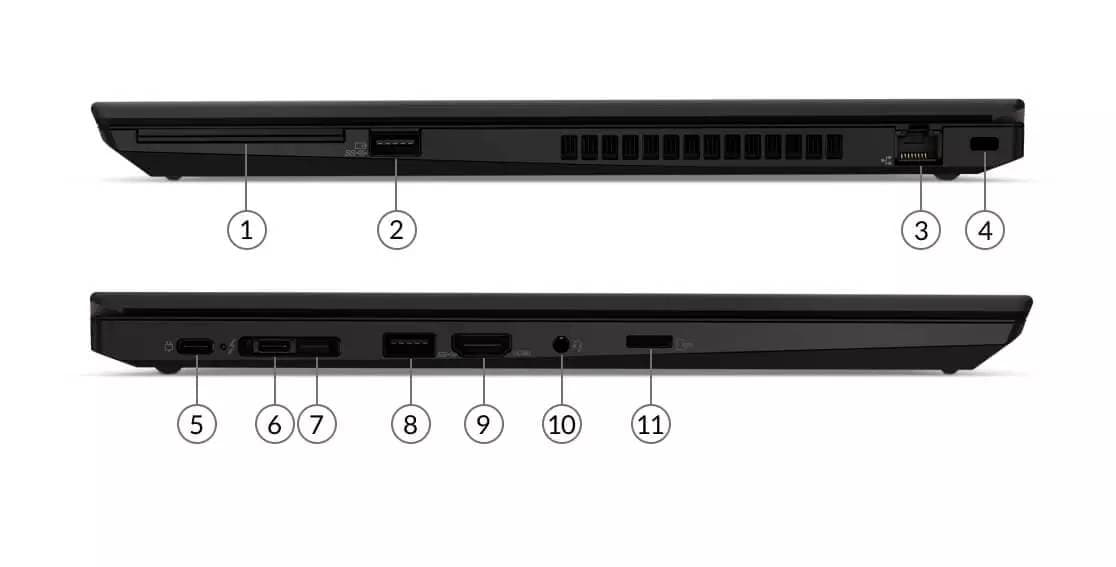
So... do I tell my grandma to plug it into the "weird robot"-symbol port (5), or the "danger, high voltage" one (6)? It fits into both.
> No, not at all. 20 to 10 years ago all charging ports (including on cameras, phones, everything) were barrel plugs of slightly different diameter; everybody's cranking out their own boxy black chargers putting out maddening variations on the same ~20V for laptops and 3-5V for smaller devices, you can't share chargers between devices, can't always find the replacement, especially if the device is on the older side. Buying a device with a different connector - bam, old charger goes to e-waste (or e-bay).
Either way, you brought one device + one cable, and you know where to plug it.
Yes, from an average tech nerd perspective, this might be better, because people know and remember what to use where, which protocol their devices use, and which port they have to plug it in. Normal users don't.. and if it fits, they use it like that. If they buy a custom charger for their laptop, they won't use it to charge their phone, because they know their phone charger won't charge their laptop, even though everything fits.
I'm not saying it's all bad, but dealing with several older relatives, and stuff that fits and doesn't work is making it a pain in the ass, especially with stores selling stuff (eg ikeas https://www.ikea.com/us/en/p/askstorm-40w-usb-charger-dark-g... ) that works but doesn't charge if under heavy use.
> This is not really true... Some laptops maybe... Lenovo had a square one
The exact shape of the port is clearly not the point of their statement. It is that you had specific, one use, variations of chargers that only worked for one laptop and were trashed when you got something new and were very difficult to get a replacement or additional charger for. Whether they were barrel or square isn’t the point.
> If they buy a custom charger for their laptop, they won't use it to charge their phone, because they know their phone charger won't charge their laptop, even though everything fits.
But most people handled it fine if they had a tablet, phone, and a few other random devices with micro USB. For the average person, moving to the semi standard micro USB was a net win, even though some people would try trickle charging their phones with old, low power usb chargers. Just because grandma can’t figure out what she is doing, doesn’t mean the actual average user won’t quickly figure out that their USB-C charger will work for anything less what the charger was rated for. Your laptop charger will charge your tablet, phone, and extras like headphones. Your tablet charger will charge your phone and headphones, etc. that is a good enough solution for most people, and simple enough most people will be fine. Knowing you can travel with 4-5 USB-C devices and only bring your laptop charger to charge everything is much better.
>You have a lot of USB-A QC chargers, and you just take a usb A -> C cable
Why would you assume it would work? Just because the connectors fit together?
Both my computer monitor and my TV have two HDMI input ports. Should I fault the HDMI protocol (and any connector standard where server and client sides are physically identical) that I can't daisy-chain them?
My grandma has a microUSB Android tablet and a microUSB feature phone. I set up for her a dual USB-A charger and two identical microUSB cables that are always plugged in, so she can use either one or both.
I don't quite see the problem with the USB-C setup either: get several high-powered chargers for her so that she can use whichever one.
But I get it. The times really did have changed; one piece of information - the wattage of the charger - that was hidden from the consumer is now reified: all chargers fit, but only some of them are powerful enough.
Fortunately, it's mostly a question of comparing integer numbers: my phone's 25W, and the charger is 30W - it fits! My laptop is 45W though, bummer. I should get a >=45W charger for it.
But for that nuisance we traded away the obnoxious burden of distinguishing between Pump Express and QuickCharge and Adaptive Fast Charge and Adaptive Super Fast Charge, between Lenovo thick or thin barrel plugs or yellow rectangle plug, between multiple generations of Apple laptop plugs, of insane proprietary connectors like Nikon's UC-E6, of having to power hubs externally (thank god for 15W minimum), of the anticonsumer pricing of the vendors' proprietary tech, and (fingers crossed) of the ridiculous mix and match approach Apple has to its iPhone and iPad lines.
It seems to be a good deal.
By the way, I fondly remember a Sony Ericsson K510i I had in high school :) That toothy connector was finicky as hell (something I'm reminded of by lower quality USB-C hubs).
I'm pretty sure that USB wasn't created originally with charging capabilities "back in the days". Just power supply (5V @ 500mA max). Charging through USB came after and was when things started to be more complicated: someone used USB as a mean for charging a battery, then bigger batteries came, then people started to complain that devices took too long to charge, then the 500mA limit was moved, then every vendor would implement their own proprietary handshake to negotiate charging current.
> things were simple
I think USB accomplished its goal by standardizing a lot of communication protocols for a lot of (type of) devices. I lived through the 80's and 90's as a kid. I still feel the pain of plugging a new mouse or joystick and try to make it work. Then USB came and it was 'magic'.
Edit: still, if I have a serial port outputting data from a device I'm debugging and I turn on my PC, sometimes Windows would think it has a Trackball mouse connected to the serial port and will move the cursor around until I reboot my computer... I say this as a reminder on how things were back in the day (regarding communication protocols for devices).
It was never that simple. Your serial cables had peripheral or null-modem (I have a serial cable marked "MIDI" I have no idea what is different). Parallel port cables could be SCSI cables instead. Some cables didn't have all pins wired to save money. With PS/2 ports you had to get the mouse and keyboard the right way around despite having the same port.
It got pretty simple for a while when old serial & parallel ports were phased out in favor of USB. Also VGA worked for a very long time even after DVI and HDMI appeared on the scene.
(I never had as much trouble with connecting displays as I do today)
Oh gawd yes. Monitors and video cards and laptops all seem to come with different combinations of audio and video ports and I am enough kinds of geek already - I don't Want to be a/v geek.
"Back in the days" you would either buy an original charger, which the store probably wouldn't have in stock, or buy one of those universal charger with a dozen plugs in which case you would have to be careful to pick a powerful enough charger anyway. You would also have to be very careful to pick a charger with the correct voltage.
Yeah, back in the day I would always be afraid to fry my device when plugging a 3rd party charger, because of the polarity or voltage. Now worst thing that can happen is... nothing. For me that's an improvement.
Go on any manufacturer site and see what they charge for their USB-C 65w charger that's enormous. Then look at the price of an Anker GaN 65w charger the size of a d-cell battery that's half the price. I think the user freedom and choice is worth some additional complexity.
I was trying to help a lawyer out and trying to explain why the $5.00 USB-C cable he'd bought from Amazon wasn't delivering 4K video to his expensive monitor AND powering his laptop too.
Me: OK: so its a USB-C cable, but its not a high data rate USB-C cable.
Him: But, its a USB-C Cable.
Me: but, no, not all USB-C cables are high speed cables. And some of them can't do high speed and power delivery
Him: but... its a USB-C cable: it plugs into the port.
Me: Um... just because it plugs in, doesn't mean its going to work. You can have USB-C cables that are actually slower than the old USB ports.
Him: but.... shouldn't it just work?
And so on. For... 15? more minutes? maybe 30? I finally got him to buy a "proper" belkin USB-C cable . Which was bought from a company that should be anonymous, but lets just say that a "refurbished" cable was shipped, which, surprise, surprise ,didn't work, for ANYTHING.
This basically sums up everything that is wrong with Tech thinking vs User Thinking.
I'm going to hazard that much of the punchline is due to terrible QC / fraud problems on the shipper's website. It would not be a former bookseller named for a South American river, would it?
I think we're in a troubled phase of the transition to a truly universal port. I believe soon enough most cables and charging, bricks, and devices, will start to be more versatile and also better labeled. At this point companies are still transitioning and people still don't understand the concept so we'll either. Maybe we need something like color coding in cables, similar to the color strips in resistors. We definitely need some way to know what a cable supports after the label is long gone. With that said, I still prefer the current situation where I can charge my laptop and my phone with the same cable and charger, and the same port can be used to video out.
> "Back in the days", it was a bunch of different ports of different sizes and shapes, and each thing had its own cable that fit into that thing only, and into only port only on the back of the pc.
When I was a young kid just getting into computers and didn't know what the hell I was doing, I would try and connect the parts solely based on what wire fit into which hole. And amazingly, it just worked.
Today, I'm still replicating that clumsy behavior, albeit in different ways.
It was absolutely not that simple. You could easily destroy a device if you only went by the fit of the connector. There wasn't even a guarantee that 2 cables with the same ends were compatible since you had both straight through cables and crossover cables.
Valid points. It's finally getting better, but one has to wonder what took so long.
Luckily, it seems QC is finally fading away. Last gen it was a subset of PD anyways, and I've not seen many devices advertising QC5 as a selling point.
There are other more niche chargers and cables - look no further than Oppo and Xiaomi and their proprietary things. I suspect this was mainly because USB spec fell behind, leaving companies to go it alone. I imagine these too will go away as the specs now cover their intended charging speeds.
In the past, I'd always wished these cables were color coded for quick identification. Like probably many people, I have a box full of unlabeled usb cables that I have no idea the specs on. These new logos will certainly help in that regard, at least. Once I get a few, I fully intend on getting rid of this box of random cables.
The # of types of parallel ports was never that simple. One port, many possible speeds and support modes.
> And now? You buy a new laptop... usb-c charging, great. You need another charger, you go to the store, find a usb charger, buy it, plugi it in - everything fits - but it won't charge. You need a fast charger... back to the store, bring it home, doesn't charge. You need a PD charger and not a QC charger...
All the chargers I've gotten are multi-mode.
And yes buying a tiny charger is a problem. Yes it sucks, but back in the bad old days I had an android phone that came with a charger that could barely charge it if I was streaming video on the phone while it was plugged in. Oops!
I've also had laptops that came with such a weedy charger that it had similar issues.
FWIW my el-cheapo USB-C hub, charges almost everything.
I wonder if it's possible that we standardize on the "hole" (USB-C) and then make little square things with a male side and a female side that plug into the cable and into each other to add capabilities to the signal path. Each of those square things would have a name and an icon and every device would be characterized by a list of these widgets.
(In part I propose this to validate whether this is the correct mental model for what a cable is and what it is expected to do.)
I am surprised this is the top upvoted comment on HN, in the past anything suggesting USB-C complexity was not the right solution and the old days of simple cable usage were better always get downvoted or intense disagreement. Sometimes it is hard to judge the sentiment of HN.
Rumours suggest Apple will go back to Magsafe ( hooray ) and offer USB-C as additional functionality. That way the mental model is simple. You want, fast, full speed usage of your Laptop you use the original charger. If you use USB-C to charge, dont expect it to keep you full voltage given it depends on both cables and charger.
I have also wanted USB-C cable to simplify into two model instead of giving 6 options.( if I remember correctly, may be more in the newer 2.1 specification ) Just 2, thinner cable = (may be 30W), and thicker cable is Full USB4 + 240W capability.
Right now you can even have USB-C cable without data lane. Although no longer possible with USB-C spec 2.1, but that doesn't solve the problem as there are no mandatory requirement to force the usage of newer spec.
It really is a bag of hurt. USB should now stands for Universally Silly Branding.
The fact that USB-C is a bloated and complex standard does not imply that other solutions are better. Magsafe is only nice to the extent that all Apple laptops used it, so if you were in the apple world and never lost your $50 charger it was fine.
But in the end it was Yet Another Laptop Charger, and it made travelling a pain for anyone with multiple laptops of different make. The current status quo is not perfect but it is much better than it was.
USB-C PD cables will work for your new laptop same as the old laptop. I can bring a single power brick (with 3 USB outputs) and charge a macbook and a windows laptop and my phone-- all at once.
Will it support higher wattages? Maybe not: the cables have to advertise their supported wattages. But maybe that's preferable to years gone by with shady USB cables that would happily cook your phone due to bad wiring.
QC is a red herring here, as it was never a USB standard. Some vendors decided to piggyback on a standard connector with a goofy protocol: as if some motherboard / switch vendor decided that the PS2 connector should also be used for a high-end network connector as well.
In classic USB committee style, they try to do the right thing and still bungle the naming/marketing.
Just like the absurd “hi-speed/super speed” debacle, they fail to mention what people really want to know:
“Will this drive my monitor?” — bandwidth tells me most of what I need to know but to the average user it makes no sense.
“Is this a fast cable for my external drive”? “Is this really expensive cable overkill for my external drive?” Sorry, most people will have to guess, and will get the more expensive one “just in case”
“Will this work with my YYY” (i.e. “Does this have the alternative mode I need” — who knows?
“Will this charge my XXX?” - this is mostly right TBF: if device wants Y watts, choose a charger and cable with that number or larger. The knowledgeable user may be able to “trickle charge” their device in a pinch but not everyone needs to know this,
Isn't charging also complicated by some fast-charge protocols? I know the phone accessory companies are always saying things like "Supports Qualcomm Quick Charge 23.45 with Sprinkles" in addition to "18 watts". I think the cables might more or less be the same, but it's still a complex ecosystem question.
I have two devices with USB-C chargers. I can make a reasonable guess that the bullion-cube sized charger provided with the phone isn't gonna be able to supply a thirsty 15" laptop, but will the 65-watt laptop brick be capable of the right wiggle-dance to convince the phone to quick charge, or will I plug it in overnight and find it saying "62% - charging slowly" when I check in the morning? I end up carrying both when I travel, eliminating the convenience that USB-C promised.
I'm also going to go out there and say that USB-C laptop charging is stupid when most devices are limited on their USB-C ports. On my laptop, I can apparently use a USB-C to DisplayPort cable to get 4k/60 output (while the HDMI is limited to 4k/30). But now I've got no way to charge it.
I wonder if PoE could be delivered through a docking station as an alternative means of charging a laptop.
>On my laptop, I can apparently use a USB-C to DisplayPort cable to get 4k/60 output (while the HDMI is limited to 4k/30). But now I've got no way to charge it.
On my old-ish XPS I've mitigated this limitation with this 18 Euro cable that unifies display-port and USB-C power delivery:
>I'm also going to go out there and say that USB-C laptop charging is stupid when most devices are limited on their USB-C ports.
USB-C charging isn't stupid, it's actually super convenient; what's stupid is laptop manufacturers who cheap out on ports and display outputs to save $10. The 4K@30Hz HDMI 1.4 ports are a killer when I still see them in 2021. But hey, manufacturers do this crap since the technology clueless bean-counters in megacorps fall for the cheap laptops with crippled ports scam if they see a saving of $10 per machine on the 10K unit fleet. For the same reason they still sold you 720p TN displays on some laptops until recently. And I think some still do in developing countries if you ask for them. Crazy, I know.
> Isn't charging also complicated by some fast-charge protocols? I know the phone accessory companies are always saying things like "Supports Qualcomm Quick Charge 23.45 with Sprinkles" in addition to "18 watts". I think the cables might more or less be the same, but it's still a complex ecosystem question.
Those weirdo proprietary protocols were intended to get around limitations of USB 3 charging capabilities over Tupe A connectors. Any phone with a Type C connector should support power delivery; if you charge it via a legacy A-C cable well yes, you’ll need the same charger you used to have.
I hope all that proprietary crap goes away soon — it also creates needless consumer confusion.
> On my laptop, I can apparently use a USB-C to DisplayPort cable to get 4k/60 output (while the HDMI is limited to 4k/30). But now I've got no way to charge it.
I don’t know what laptop you have. DisplayPort is native to USB C cabling and the Type C connector is the modern DisplayPort connector.
I have my Mac plugged into a Thunderbolt display that uses DisplayPort to display the image and also powers the computer. This has been the original vision going back the the lightpeak days.
While Thunderbolt 3 could be the same as USB 4[*], USB 4 is not the same thing as USB-C.
And then there's also Thunderbolt 4.
* - it is really not. While USB4 is based on TB3, it made some TB3 parts optional. For example, USB4 is required to support 20 Gbps at minimum, while TB3 does 40 Gbps for all implementations.
I have a Lenovo E585. The monitors I have don't have Type-C, they have the "Rectangle with one corner cut off" connector, so you use that type of cable. I don't believe that setup is designed for charging at all.
If they haven't done it yet, I expect to someone see a monitor with a built-in hub AND Type-C connectivity. They will be returned by the hundreds as people plug their keyboards and flash drives into the video socket and wonder why nothing comes up.
> most people will have to guess, and will get the more expensive one “just in case”
Good. The more full-features and the less underfeatured USB cables are bought and found around - the better for everyone. I don't buy/grab a USB cable "for the drive" I expect it to do the job every time I happen to need a USB cable.
In fact I'd like a single ultimate USB-n-All logo to exist which would mean the cable is fully and reliably capable of all (including extensions like Thunderbolt) the possible USB cable usages which existed at the moment the specific generation of USB was released or became relevant.
Having the same connector for everything is not a value worth the hassle. Having the same cable for everything is.
A 2m cable with 100W charging (the highest currently, but not for long) and video using Thunderbolt 3 is £70 inc sales tax, it's also stiffer and heavier than other cables. How many of those do you plan to just have lying around for convenience?
My XPS 15 already takes more power than that so has its own charger with a physical USB C connector (but also accepts standard USB C chargers with lower wattage). The next version will probably use the new USB C charging standard that the current cables don't support. Time to throw out all those cables I guess.
> A 2m cable with 100W charging (the highest currently, but not for long) and video using Thunderbolt 3 is £70 inc sales tax, it's also stiffer and heavier than other cables. How many of those do you plan to just have lying around for convenience?
I would get 5 if I could be sure they really will work reliably with every device in every case possible and the standard won't change in a couple of months. I almost feel like buying an insurance against this bullshit.
And I don't think they can be so heavy to the point it would be relevant. I'd rather buy the hardest I can find as mass positively correlates with reliability in electronics.
That's one option, but not everyone has £350 to spend on cables. (Especially when next year they'll all no longer be the full-featured-est around, there will be some newer thing only newer cables do).
G-d knows I would hate to spend this much on cables and this is not a negligible amount of money for me either but I would bear this if they wouldn't change the standard every year. USB 3 persisted for long enough, I really hope this hassle with USB-C will end and the things will stabilize for some years.
I can find cables claiming the same spec (100W, TB3, 2m) for 20-30 EUR. Less if you drop the length requirement -- 2m seems quite long, especially if you're using TB3 to connect a laptop to a display. I agree that there's a place for lower-spec cables that are cheaper and thinner.
They’re almost certainly 20gbps TB3 cables if they have sufficient signal integrity to be in spec.
Anyway, the 2m 40gbps cables I have are actually thinner, lighter, and more flexible than either of the 2m 5-10 gbps USB-C cables I have, or even some of the really short and cheap 5gbps cables that come bundles with SSDs. Active cables might be expensive, but at least they allow using higher gauge and/or less shielding for signal wires.
> But at least most people can just filter on one logo
I doubt many people ever look at the logo. For ordinary people it's just USB and "this is a shitty cabble" if it doesn't work as they expect, geeks will look for a specs table on the page/box.
The intention is obviously good and sort of addresses the problem but nowadays (even with Micro-B, not just C) I don't feel like I can trust any logo really. I have to read the specs, the comments, consider the brand reputation and buy the best cable I can find (which is a game of luck anyway) to minimize the chance it will surprise me unpleasantly.
With bandwidth, the monitor packaging/manual can at least simply say that you need a port and cable that both say at least 10 on it.
That's much better than the previous mess at least.
The alternative would be one new logo and a requirement that all the cables have to meet all the criteria, which would in theory "only" make cables more expensive, and in practice lead to many fake/mislabeled cables that work sometimes.
It needs the USB3 diff pairs. It is perfectly possible to have a USB2-only cable with USB-C plugs. You never know with fly by night brands where they've skimped on production costs.
I have USB cables that just work with charging, some give me USB 2.0 data and one very expensive that lets me extend my USB hub/dongle. The latter works with video and power delivery. I tried cheaper cables before and something always went wrong.
This is all too confusing to me. Why isn't there a mandatory (or reference) specification string that combines all the necessary, useful information in one neat package instead of countless repetitive and easily misunderstood logos? Something like (just a basic, messy example)
USB-C/<generation>/<bandwith if any>/<supported power delivery if any>/<can drive audio/video>/<supports PD>/etc.
I had to buy some cables recently and really couldn't pick one nor distinguish particular features at glance, and the item description and graphics can be deceiving, even more so on stores like Amazon
I recently moved my desk between rooms. After setting everything up only one monitor seemed to work.
Tried multiple DP cables plugged things in and out with things in various state of power. Eventually gave up and chalked it up to karma and either having a dead monitor or dead dock.
Unplugged my laptop to go work in the lounge for a bit, came back later and plugged it in again amazingly both displays worked.
What changed? I plugged the dock into a different USB-C port. The one that actually supports DisplayPort Alt-mode.
Well probably not. Note that it's the same price as the USB-A port and cheaper than any of the others.
Also the base of each of those modules is USB-C
> Do I need to have a USB-C Expansion Card to charge the Framework Laptop?
> The Framework Laptop charges over USB-C from any one of the four Expansion Card bays. We suggest configuring with at least one USB-C Expansion Card, since it is difficult to directly plug into the recessed USB-C receptacle that is inside the bay.
This probably means the body of the laptop supports all those things and the USB-C module is just wires.
What's the cost of that support in the body itself? Not stated.
This whole sub-thread is just a really good hilarious demonstration of the whole problem, nobody has any idea how to figure out what a given cable or port will do anymore. We can't even talk about it without getting confused. (But can still be snarky to others who we think got it wrong, even when we're wrong ourselves. It's the internet, we'll never run out of superciliousness!)
I've dealt with it too. Some USB c extenders even won't carry some signals, such as video. It's an unbelievable frustrating mess. Just because thunderbolt uses the same USB c style connector doesn't make it usb c I wouldn't think. I figured the connector itself would have its own name, such as rj45 does. But who knows with this shit show.
USB 3.2 is not Thunderbolt. USB 3.2 achieves 20Gbit/s with signalling that is entirely incompatible with Thunderbolt signalling. It is completely possible to have a 20Gbit/s USB 3.2 port that has no Thunderbolt capabilities.
The first USB standard to incorporate Thunderbolt functionality is USB 4.
the point i made is just as true though, as the announcement that thunderbolt switched to the usb-c form-factor is 6yrs old now. (and was even linked to from someone else in this thread!)
the downvotes just show once again how hilariously dumb the average hn-reader is.
It doesn't matter whether the point you were trying to make is true or not, because Thunderbolt is irrelevant to the problem that was described. DP Alt mode is not the same thing as encapsulating a DisplayPort stream in Thunderbolt signalling, so knowing which of your laptop's Type-C ports is Thunderbolt-capable does not tell you anything about which of the ports is capable of DP Alt mode.
Stop calling people dumb until you can make a comment that is at least somewhat correct and on-topic.
What's confusing about "USB C to Lightning Cable MFI Certified iPhone Cable Fast iPhone Charger Cable 20W PD 3/6/10FT Type C Charging & Syncing Data Compatible iPhone 12 Pro Max Mini 11 X XR XS 8 P iPad iPod (White)"?
..which only took hours to find on Amazon, and you're sure you finally have the correct one. Then the first review goes "this cable is shit, it doesn't charge".
That first review is identical to the first review on every single other USB-C cable, regardless of brand. It's like the top review of ever single power strip being "I overloaded it and my house burned down".
No wonder people take the risk by buying the cheapest option and hoping they win the QC lottery.
I thought about calling that out, but it's really both - the reason that these sellers create these horrible titles (which Amazon enables and should address) is because customers don't have a clue what cable they should be buying. If buying a USB cable were dead simple, there'd be much less need for your average consumer to have to specifically search for a cable they know will fit their device (e.g. "fast charger for iPhone")
Assuming there's not some gotcha I'm unaware of, these new logos seem sufficiently descriptive. USB-C/Bandwidth/Power/They all support AV/They all support PD.
That solves the issue for cables/chargers anyway. Devices can still support whatever alt modes they want, and there's not really a way for the USB IF to fix that since the details of specific alt modes aren't really part of the USB spec AFAIK. That'd be up to the ones defining those particular alt modes to fix.
I don't agree that the new logos are sufficient. Perhaps "sufficiently descriptive", but they look so similar to each other that it requires people to read text (which is a UI fail right there for cables) which will be particularly hard to read when printed on tiny connectors.
The new logos show the word 'certified'. Wait for the "super-certified" and "ultra-certified" USB logo variants in two years, to help clear up the newly-latent confusion.
One new logo shows the word 'charger'. Wait for the "super-charger" and "ultra-charger" and "really really a charger" variants in three years, to help clear up that newly-latent confusion.
Leibnitz had a hypothesis that all one needed was one base word, with all possible meanings to be encoded by diacritics. USB tells us we only need one logo for all backplanes-in-a-cable, with all possible variants to be flagged by graphical diacritics. Reincarnation gone wrong.
I am waiting for UUU cables -- Ultra Universal USB. "We have both kinds of religion: universalist and unitarian."
I assume you'll only be able to legally use these logos on your products and packaging if you actually pay for certification. Most USB devices/charges/etc aren't certified today, I don't see this new logo scheme changing that.
Certification costs money, and you might fail. No consumer really cares (or probably no consumer understands) what buying a "certified" USB thing even means.
If your existing USB things don't have the red white and blue USB logo on them, they're not certified. Info: https://www.usb.org/logo-license
I am also wondering how can they enforce small manufactures just slapping these logos everywhere? It is unlikely the organisation is going to achieve anything by trying to sue small Chinese producers.
I believe the standard approach for misuse of such logos is to treat them as counterfeit goods (e.g. fake Gucci bags) which has an established process of seizing the goods at customs or distributor's warehouses and often destroying them. There's no need to sue the overseas producer specifically, as any distributor or retailer are also liable; and in general there's no need to sue as a cease&desist (to the local reseller within the reach of any penalty if they don't comply) is generally sufficient.
I expect the USB organization can sue Amazon and other vendors for allowing these kinds of products to be sold if they're illegitimately using the logo. I'm not fully versed on copyright or trademark law but I believe that's what would apply to the improper use of this logo on a product.
I know at some point I'm sure I asked for fewer connector types. Seeing it now: I suspect unique connectors to a purpose is insanely useful usability. Immediate failure feedback has it's uses.
I recently received a new work laptop in the mail. And IT had stuck a piece of paper inside explaining it is essential I only charge it with the charger it came with, other usb-c chargers/cables might not work and could possibly damage the laptop. I am very ignorant on usb-c, but to me it seems crazy it's come to things like that.
I think that piece of paper spreading FUD is a simple attempt by the IT department to minimize the number of people trying to charge their laptop off of an 10-18w cell phone charger and generating charging failure tickets in the system
Dell famously won't charge off anything less than 65w USB-C PD when turned on, and I think 30w when turned off. Apple will trickle charge when off, on 15w (standard phone charger) if the charger truly is USB-C PD compliant (about 50% of the time these days)
Given that most people don't own a 65W USB-C PD charger (yet) I can see the IT department adding warnings in an attempt to avoid confusion and reduce the amount of extra work.
That said, I've been using USB-C 65W chargers since the original Pixelbook came out + Nexus 5, and later Anker branded 65W chargers and I've never had any problems. I generally don't use off brand stuff though.
Damaging it? There's definitely historical evidence for it [1], but I think the situation is a little improved these days. I personally had a nexus 5x charger damage a Pixel 3a such that that charger and usb a-c cables were the only ones which would work in that device from then on.
Not at all - its likely they wanted to reduce support calls from people who try and charge the laptop using mobile phone and other inappropriate chargers.
I use dell, Lenovo, & apple PD chargers interchangeably without issues.
The 2016 model will charge in sleep mode on a 30w charger, it's just glacially slow, 2-3% per hour at best. 65W seems to be the universal standard for day-to-day use with laptops.
You can charge with any cable that supports that power level. The problem is you can buy cheap cables that don't meet standards and can burn up. Or, the laptop won't charge at all because the user's own charger doesn't support Power Delivery, and IT doesn't want to deal with supporting 3rd party chargers—I know my Dell XPS 13 won't charge over normal USB at all, and needs a 45W charger to charge at full speed.
My own work laptop is a bit old and has a barrel plug and USB-C. When the laptop is truly out of juice, only the barrel plug will charge it. So I can't leave it at work. YMMV.
Not common, but there are models more susceptible to issues than others. For example I've got a Lenovo Yoga which breaks when connected to an apple charger. The touchpad starts to misbehave and if you put it to sleep, it won't wake up until you disconnect the charger. (no long term damage though as far as I can tell) OnePlus 6 phone behaves correctly, but gets much hotter with the apple charger than with its own / google nexus / lenovo.
I burned out my XPS 15 USB-C charging electronics by using a high-end charger. I think many laptops of a certain age were not rigorously tested for USB charging. Hopefully that's changing.
Most of the anecdotes revolve around a specific faulty dock whose manufacturer thought it were a brilliant idea to implement PD with a microcontroller that used 9V signalling level, whereas the (standard compliant!) Switch PD chip expected 5V (with 6V max) and as a result, the dock fried the Switch's PD chip.
Also, the Nintendo Switch Dock's male USB-C plug is a tiny bit more narrow to provide a smooth slide in/out (and the Switch-side female receptacle is standard-conforming)... un-licensed and thus unaware dock vendors cluelessly tried to emulate that and botched the tolerances, exposing the CC pins to 15V.
I wish laptops would've standardised on the 20V barrel jack (maybe with slightly different sizes to denote current capability), like they almost did before USB-C came along.
Yeah, IMO the issue is really information - ports, cables and chargers should have a clear information about how much power and which data can be delivered.
In a 20V DC barrel jack case, so you don’t plug in a device with 4 ohms of resistance to a $2.99 charger spec’d (and only capable) to only deliver 20W of power. (Realistically, not every one of those chargers will have a current limiting supply inside.)
I think you've rebutted your own point there, laptops cost hunders or thousands, whats with $2.99 power supply? You spill coffee on the laptop and the power brick burns your house down?
I shorted many laptop power supplies while using them to test LED's strips, all of them seemed to have current limiting.
I don't think that the only (or even most common) source of power supplies in people's houses are from the OEMs of laptops.
In an alternative timeline where DC barrel jacks were the standard form factor, you'd have just as many sellers of the cheapest possible power supply in that form factor as you do in the USB-A form factor today. Engineering choices have to take into account the reasonably foreseeable uses and misuses of a design. In this case, having current relating to the barrel diameter seems reasonable. (A phone might prioritize thin-ness and doesn't need a lot of power. A 100W piece of desktop/benchtop gear or a laptop can better afford the increased diameter of the higher current supply. Not to mention that it gives a somewhat intuitive sense to non-engineers.)
'In an alternative timeline where DC barrel jacks were the standard... having current relating to the barrel diameter seems reasonable.'
There are too many possible variations, I have 6 devices in my house, and their power supplies are 130W, 65W, 45W, 25W, 18W and 10W. You would have waay to many barel diameters.
The key benefit is using a larger power supply to charge smaller device.
If you want a standard that is usable, you have to have features like current limiting
For the purpose of power delivery this makes sense, but for the purpose of sending data down a wire, most people’s use cases can be done with the throughput of most usb-c cables, it is really convenient to just use any cable lying around for any data usage.
It was a missed opportunity to decouple power delivery from data link at the port through a visible, mechanical design like maybe a two-part connector. That way the data-only portion should always work as long as you've got a proper cable.
The NEMA code is exactly what I think about when I think about USB-C's failures. Imagine if NEMA connectors were standardized and the voltage/amperage was disconnected from the shape of the connector? Ridiculous.
While a standardized USB-C connector with non-standardized features isn't that dangerous, it's equally stupid, and was solved decades ago.
1) NEMA connectors cannot signal how much voltage/power they can handle though. If they could, there would be more pressure to use a single connector
2) You absolutely can plug the wrong IEC13/14 cable in to incompatible devices, or pass more capacity than it's rated for. For example, I've seen equipment with IEC14 sockets that only takes 120V (not SMPS), nothing stopping you from plugging in a UK240xIEC13 and letting some angry pixies loose.
Is that IEC compliant usage? Who knows, but it's convenient so manufacturers do it anyways.
Please, for the love of god, make it obvious if a USB C cable can be used as a display cable or not. One thing that absolutely blows about USB C is that they all look the same, but to connect my LG UltraFine to my GTX 2070 I had to do literally hours of research before I could find a reliable cable on Amazon that was a “bidirectional USB C DisplayPort” cable because I naively assumed that USB C was a general purpose cable type that could do data/display/power/etc. Having one plug be capable (or incapable) of doing so many things melted my brain.
Why can’t all USB C cables just do all the things? To me, the fact that I can plug a cable into my graphics card… and it fits… and then it does nothing… that’s awful physical UX.
*apparently active Thunderbolt 3 cables are an exception and won't work.
But it's better not to rely on Thunderbolt 3 cables to be valid USB 3 cables.
Of course, it's better now with Thunderbolt 4 where every Thunderbolt 4 cable is also an honest to god USB4 cable, and it's not as confusing for the consumer.
What's the difference in cost between a cable that can do the bare minimum, and a cable that can do everything, assuming they're the same length? Just seems like the USB committee is unnecessarily complicating everything.
> What's the difference in cost between a cable that can do the bare minimum, and a cable that can do everything, assuming they're the same length?
A USB-C cable that can do the bare minimum needs five wires (one twisted pair for data, power, ground, and the configuration channel), and they can all be thin. A cable that can do everything adds to that four more differential pairs (which also have more stringent signal integrity requirements than the lone USB 2.0 pair), one extra pair for sideband use, and the power and ground wires must be thicker to handle the higher current. So it's tripled the number of wires, made some of them thicker, and the cable has to meet a more strict signal integrity. No wonder it's more expensive.
That depends on the chosen wire gauge and length of the cable, but even the most cheaply made cable would be significantly more expensive if it supported all capabilities. You can't go lower than the cost of materials and cables necessarily use a lot of copper and plastic. Adding support for more capabilities requires adding more wires inside. And the more wires you have inside the cable, the more you have to worry about cross-talk, so you need even more material for shielding and you need to twist the wires tighter (and a tighter twist shortens the wires so you then need those to be longer to reach the same distance).
A couple of years ago I couldn't find a cable that did the max speed with max charging for any price. Now looking it seems like you can get a TB4 with 100W 3' for ~30 dollars and 6'-7' for ~60 dollars. Or a 5 pack of standard type c cables for ~10 dollars.
You can send back a cable that doesn't match a well established spec, you'll have lost about an hour of your life.
It's harder to return a cable that had some numbers but not really matching what you're trying to do with them, and arguing back and forth about wether your iPhone 14 was supposed to transfer data at full speed with their "high speed" "iPhone serial A23XXXX~A324XXXX supported" cable. And you'll already have spent a tremendous time trying to find something that could vaguely work in the first place.
They already had USB4 cable logos denoting either 20Gbps or 40Gbps (still on the USB-IF website). This is in fact a rebranding, and the first USB logos since the very beginning of the standard that don't feature the trident.
Hmm the article did not clearly state this, but I assumed that the 240W / 40Gbps labels were just an example. Hopefully they are not neglecting a huge portion of the market that does not need that much PD...
Rather than messing around with logos why not mandate a specific typeface to be used mentioning the version/speed/capacity immediately next to the logo? Rather than screwing around with more hieroglyphics pretending it is the solution, just write it out.
If it explicitly said the USB version I'd agree, but what they're doing here is more of the same pointless nonsense. This[0][1] is the junk that consumers currently need to wade through, now we have several more additions to it.
Unless you can get Apple to agree to use these logos on their official cables, this kind of standard isn't going anywhere. And I don't think Apple would be seen dead with logos that look like that.
Honestly apple does not need those specific logos. They just need to label their cables in the first place. They could use their own trademark(s). They are big enough that tons of people trust them and will take an apple with 100W and 40G written on it at face value. Then tons of people who don't trust Apple will scrutinize their offerings heavily.
Apple only sell 1 USB-C cable officially though, and it's listed as being charge-only- I know we all see Apple cables around, but at least they only have 1 and if it differs its marked; for example they also sell a "Thunderbolt" cable, but it's marked.
If they want to be the "cable and connector for everything", they should simply require more specs. If that increases the diameter and cost, then so be it.
This whole thing is such a confusing mess, and destroys people's devices because of poor implementation (nintendo switch for example).
You can make a cable that support 40 Gbps / 100W, but it will be $50 and very thick, with a maximum length of 1m (or cost $400 if you want an optical 10m long cable).
Or you can make a thin, 480Mbps / 5W cable that costs $2 that can be 5m long.
Or you can make a 10Gbps / 20W cable that is $10, can be 2m and is medium thick.
If you want them all in one cable, all cables would be $400, which would be a larger problem for most consumers (and even optical cables can't really be bent / are very fragile. So unfit for travel. Not a good solution either). You can't have everything in one cable.
You could claim that there should be 3 separate connectors then for the 3 cases above. But I don't think that would be an improvement really. At least you /can/ charge your laptop with the thin cable overnight, even if it is slow. And you can connect your phone to your laptop charger etc.
It's the other way around. USB-C tries to be too many things at once and this leads to confusion. They should have either mandated that it only handles the top end of the spec at the physical level and gracefully degrades if that isn't available on either end (so at least the cable would be standard), or use physically different plugs to avoid accidental frying of equipment and things just plain not working.
1. There needs to be a small, inexpensive device that:
A. You can plug into a USB-C port and it tells you what that port is capable of as far as power delivery, data rates, and data protocols go.
B. You can plug a USB cable into the device and it tells you the power, data rates, and data protocols that the cable can handle.
2. There needs to be inexpensive true USB-C hubs. It needs to be possible to have computers that only have USB-C ports, peripherals that only have USB-C ports, and only USB-C to USB-C cables to hook the peripherals to the computers.
Right now if you have a computer with N USB-C ports and M peripherals with USB-C ports and M > N, you generally have to use a hub that hooks to peripherals via USB 3 A ports, and so you need USB-C to USB-A cables.
I don't need cables or chargers to be less confusing. I need the damn ports on devices to be less confusing. One of my family's phones supports Dash charging and DisplayLink but not usb-3 speeds or charging while outputting video. One of our phones supports HDMI out while charging but only supports QuickCharge v2. One of my tablets will charge over its type-c port but only at 400mA, and you're supposed to use a different port for full speed charging. Then there's my Nintendo Switch that violates so many parts of the USB spec some of my OEM phone chargers won't charge it at all.
So it’s good that the fruit company are finally going to be forced by the EU to implement USB-C on their phones at same time as telling me that I need a matrix to explain which usb cable I need.
I share this opinion. I'm deep in the Apple camp but it never bothered me that they didn't jump on USB standards. They are a complete mess and if I plugged a shoddy cable into my device and fried it I would be super pissed at Apple for putting me in a position to make that mistake.
I don't charge my recent generation MacBook with anything other than the Apple charger for this exact reason.
How is a poorly made cable Apple's fault? Apple could make a proprietary connector with an apple shaped plug on each end. Yet you could still end up with a dead device because someone made a cheap clone cable with an internal fault that shorted the data line to power.
The cable is not Apple's fault. One of the reasons I like the Apple ecosystem is that I trust that they protect me from insanity like this. It's probably inevitable that they go all-in on USB in some form or fashion, but I hope they resist until it's impossible for me to *destroy my hardware* by plugging in a cable.
Reading through the comments it seems those right two logos are the best solution we have. We need a way to quickly identify speed and power ratings per cable. Users might benefit more from simplifying further down to something like colors to establish baseline requirements ("Requires gold rated power delivery") but setting those baselines doesn't provide room to grow and expand the standard.
Because lightning doesn’t even support anything. Half the things you might plug in a cable for, like video out, are implemented by a chip in the cable itself (which means you still need to buy specific cables for specific jobs), and lighting doesn’t even have the bandwidth to provide real video out at an iPhones screen resolution, let alone operate at 40Gbps. Moreover you have exactly the same issues with lightning charging cables, if you buy the wrong one it will not charge at the desired rate [1].
Lightning does not come close to solving these problems.
What is stopping the cheap knockoffs from putting these logos on cables and devices that don't actually meet the specifications? A logo that says "certified" doesn't actually mean anything.
One more thought that comes to mind is that the new logos implicitly uses English terminology. I wonder if terms like "gbps" will be understandable in all cultures around the world.
Seriously! If I see something like mbps written I have to wonder whether it's saying megabits or megabytes per second. Bits is more likely only because it gives a higher sounding number, but outside of marketing either bits or bytes is equally likely.
I remember reading USB-C cables are still relativley expensive to manufacture. Wonder how long before baseline cable quality is good and cheap enough that any cable will do.
For the original USB that took close to a decade. There were many years of cables of with just the right resistor to work with samsung phones for example.
Across USB-C land, there's the various USB3s as well as Thunderbolt, DisplayPort, PCIe, and probably others, too, all sharing the same connector with arbitrary overlaps or omissions of compatibilities across the N-dimensional matrix.
Thunderbolt 4 is Intel's specific branding and certification program for its USB4 implementation. Thunderbolt 4 takes USB4, and turns on a bunch of the optional features and makes them mandatory (TBT4) requirements.
I’ve only run into those once in real life but man what a mess of a committee’s design.
Actually let’s go back to DB-25. Each pin can be one “feature” so you can identify which features a device/cable support by looking for which pin(s) are missing.
Unpopular opinion: I prefer a laptop with a barrel jack than other with only USB-C for charging.
Not only is easier to find, also a lot more sturdy and easier to repair. I have changed some of them in relatives' laptops pretty easily, but I don't dare to do that in any USB-C by any means.
This isn't a case of a standard coming along to a crowded market. Rather, this is the opposite scenario. USB-C won and now they have to deal with the fallout of unifying all the things past, present, and future.
Previously we had tons of incompatible plugs, but if the physical plug fit, you were reasonably assured that it would actually work. In our shiny new future everything is shaped like USB-C, but you can't tell whether anything will work simply by eyeballing the plug. I'm not convinced this is progress.
That's fairly recent. At this point in the adoption curve of usb1/2 we had different cables and chargers for different brands of phones. And some did not have the data wires connected.
Touché, I actually did and even soldered my own at times! I'm tempted to say that's different (tm) though, since you generally had zero expectation that random DB-9/25 cables would be interchangeable.
Or, you just buy ones adequate to your needs. Buy one visual style for charging, another for data, or label them if you are really neurotic. You can definitely tell the better ones, they are thicker and stiffer.
I'm all too eager to deprecate my box o' rando mini/micro/meso USB A/B/hard drive cables.



"Back in the days", it was a bunch of different ports of different sizes and shapes, and each thing had its own cable that fit into that thing only, and into only port only on the back of the pc. Yes, you needed 20 cables, but things were simple.
Then came the USB... one cable, one protocol for all.... except video (firewire) and storage (esata). Then even those got replaced by USB, as new usb standards made it faster.
And now? You buy a new laptop... usb-c charging, great. You need another charger, you go to the store, find a usb charger, buy it, plugi it in - everything fits - but it won't charge. You need a fast charger... back to the store, bring it home, doesn't charge. You need a PD charger and not a QC charger... store again, new charger... plug it in, doesn't charge. You need a PD charger, that goes up in voltage enough (20V) to charge. Store again, a new one... you plug it in... still nothing. Even though it fits in the hole, not all holes are equal, and you need to plug it into the correct usb port to charge the laptop. Yaay, everthing works! Start a game, play, nice framerate, and bam, battery low warning. Yes, it charges, but your charger is only 45W, and that's not enough, you need a correct wattage one (eg 65W).
And then you go to the store and buy an original charger for your laptop, and you're back at where we were 20 years ago, just with a higher chance of plugging the charger in a wrong port, because it fits in more than one hole.