Apple frustrates the hell out of me with their deceptive tactics to create walled gardens while pretending not to. They feign ignorance to keep you stuck and create the illusion of open doors out of their walled garden that are actually broken and they have no interest in fixing.
I've been paying for iCloud for my wife's iphone for the last several months because of how difficult Apple makes it for us to export our photos. Copying them off the phone with a usb cable is nearly impossible if you don't have a macbook, exporting them off of the website is nearly impossible if you have over 1k photos.. meanwhile google takeout allows me to download all of my photos in my browser in a couple clicks. In my experience, it feels like Apple makes getting out of their walled garden as difficult as legally possible.
If you're on linux I can only recommend ifuse with the libimobiledevice package. I followed the guide on the arch wiki[0] and could simply mount my iPhone to a directory[1] and then just drag and drop them over. For some reason there were 1000 pictures per folder so I had a few different folders, but otherwise it was super simple.
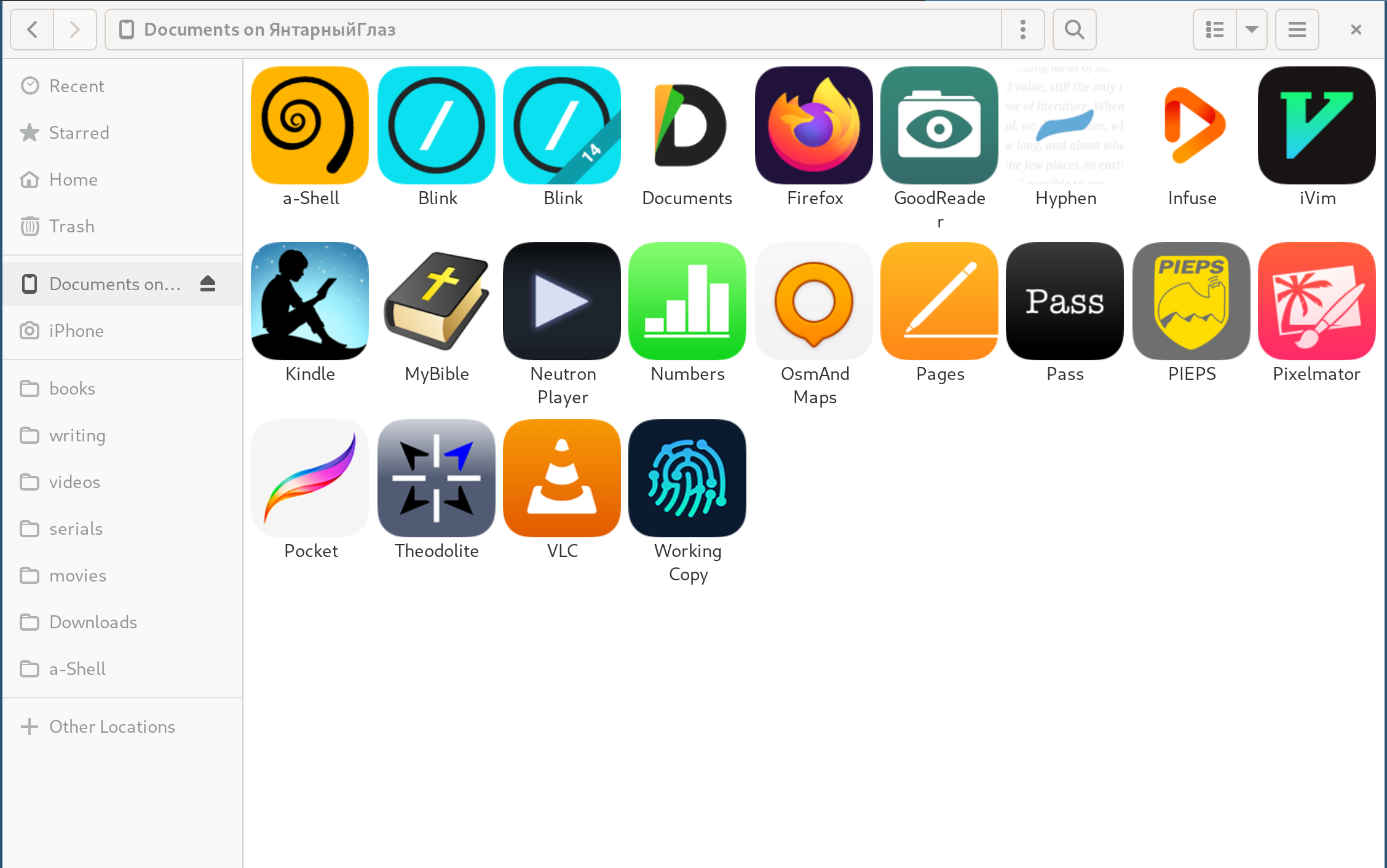
I connect and disconnect my iPhone often, so I prefer Gnome's default file manager Nautilus with gvfs-afc and or gvfs-gphoto2 (1).
My devices show up when I plug them in and I can see all my apps that expose storage in Apple's Files, with accompanying icons (2). Device folders like Downloads are off limits, though (3).
3: This entails much pointless duplication of files on the iPhone just to be able to see them from my PC. Apple would prefer, no doubt, that I use AirDrop or iCloud. But my Linux laptop means staying out of Apple's walled garden.
Can also testify to this, also works for transferring files to the device from Linux if app supports (ref VLC, etc). However, the speed is mind-numbingly slow.
Faster and easier to just sync with iCloud, then download from iCloud.
So, why not just vote with my wallet, and get a device that either is more friendly to 3rd party software interaction or simply allows saving to a movable SD card? Because overall things work very smoothly, and it is easy to find and manage settings. These things balance out well against the frustrations, especially when I know from experience that non-Apple devices will present their own frustrations.
To be fair, the philosophical/theoretical/economic foundations of antitrust legislation confuse me. This has not been helped by media bites a la NYT. Maybe if I had months and years of free time and good material I could form a worthy opinion. But for now, I just have trouble seeing how statements like this from OP are contradictory: "The company says this makes its iPhones more secure than other smartphones. But app developers and rival device makers say Apple uses its power to crush competition."
The Dropbox comment was a highly technical person belittling an app without realising that it solves problems for normal people. They thought that normal people would have no problem finding and purchasing a managed FTP service, mount it with curlftpfs, and then use SVN to get a Dropbox-like service.
The comment you’re responding to is a technical person offering advice on a way out of a sticky situation to another (assumed) technical person. It didn’t feel like they were trying to say that the average person should be able to read archwiki and use libimobiledevice to pull pictures off an iPhone… but I could be misreading the situation
Definitely didn't want to come across as belittling or anything. Just stumbled on that tool a few weeks ago when I tried to backup my iPhone photos and was surprised how well it worked and how painless it was. Maybe it's because I'm not a native speaker, but I had no bad intentions, just wanted to tell what worked for me.
>a technical person offering advice on a way out of a sticky situation to another (assumed) technical person.
even if that assumption was correct, they mentioned this being done for their wive's iPhone. Which is assumedly a non-technical person given that the best solution was a paid cloud subscription.
I don't think this is comparable. The parent comment doesn't make a value judgment on whether the strategy of using the Linux utility is a comparable offering; it's just a potentially suggestion to try to help when it seems like someone is frustrated with the solution they currently have. Giving a highly technical way of doing something isn't inherently a problem; the issue is when someone claims that it's more than sufficient and that no easier way needs to exist, but that didn't happen here.
I think that's a little unfair. The Dropbox comment was "it's absurd that people would need this consumer-friendly thing; just do [thing that only fairly-technical people could realistically accomplish]". This situation is "so-called easy-to-use consumer device is blocking you from doing something? here's an alternative that requires some technical know-how, but unfortunately there isn't a great solution here".
Look, they're clearly trying to help someone deal with a real problem using the tools available today. They're out here offering someone sunscreen and you're mad they're not yelling at God instead.
I do that as well (Android user, so it's pretty much the default), but aside from not having to pay Google, there isn't a meaningful difference here: it's just trading one company's propriety cloud backup for another's.
Google's data interoperability is quite good though (Takeout). That was something Google did right 10+ years ago and I'm glad it hasn't died on the vine (and will probably see more development now, what with all this antitrust in the air).
There’s a giant difference. The claim is that Apple restricts other companies from providing cloud backup of photos. Google Photos proves this is incorrect.
Unless things have changed, yes but no. You have to leave the app running, and turn off display sleep/lock so the phone is always awake. Which practically means it has to be plugged in. It's a major pain. As someone else commented, a classic example of Apple limiting background sync in the name of "stability and battery life". That has a grain of truth to it, but let users make that choice!
>Original quality - Store photos & videos with no change to their quality
>Storage saver - Store more at a slightly reduced quality
but I haven't really checked.
It did seem to not preserve some of the special iphone format stuff like if you edit a photo on an iphone it keeps the original and the edit wheras on google photos I just got the edited image.
Yes, but of course, that takes more data without their compression and one eventually has to pay more for storage as expected, but at least that option is there.
Some googling would find you several ways to do this (directly on the phone to external storage is possible, but yeah selecting all the photos on the iphone sucks as you have to click one and scroll-select them all):
https://support.apple.com/en-ca/guide/iphone/iph480caa1f3/io...
The easiest way is to export them via photos for mac.
I was trying to be helpful. I was responding to someone else who said they have a Mac. But, if you want to relate it to the title, I don't believe there's any technical limitation to developing an app for Windows that can help you transfer files from an Iphone. And as far as I remember, the Android transfer app on Windows (or maybe Mac) is pretty bad as well. Maybe the issue is that there's no money to be made from this, so nobody develops nicer apps. In general I do agree that Iphones are easier integrated with Macs, I personally don't have a problem with that
I have ~200K photos in iCloud and do not have this problem of exporting, I “export” regularly onto new backup media.
However, I don't really export, I turn on iCloud Photos on Windows and set it to store on an external media with sufficient space (over 2TB now) and then tell it to locally store all media in full quality.
Once it's synced, I have a local folder with all the media. I have accomplished an export. Then I can turn it off, remove the media, and go back to a c:\ folder and not saving locally.
Now, you wanted without iCloud, so then, Windows 10 or newer? Microsoft has a phone companion that can pull things, or there's file explorer for just photos.
But absent iCloud, what I've done is run OneDrive on the iPhone, and let that mirror everything to OneDrive.
(An alternative used to be Amazon Photos, but I can't keep track of their business model, and Google Photos I can't keep track of what makes them decide to replace my originals with badly compressed alternatives.)
I sort of don't understand buying an iPhone, though, if you're not buying into the ecosystem.
The ecosystem is the point.
The ease of use of iCloud, the paired camera roll for your family (not same thing as shared albums), the family sharing of apps and subscriptions, the bring-your-own domain email with "hide my email" throwaway accounts to put into spammy sites, it's all there increasingly seamless, increasingly secure, and none of it is selling you out into third party ad-tech.
If you're not into that, there are other phone systems and operating systems and other hardware all grounded on different and separate principles. There's only one place for a cohesive coherent curated "don't make me think" peace of mind, and consumers should have a right to choose that since it stands alone in opposition to the DIY bricolage everyone else offers.
I just want the auto-sync experience of iCloud photos to my own NAS. Paying Apple $2.99/mo forever just so I can have an offsite backup of my photos is so obnoxious.
I tried that but the downloads time out for me a few hundred in, and the nature of the script is such that it doesn’t auto restart or crash but it hangs and needs manual interactive intervention.
I'm running it in a container. So I haven't noticed any such issues. Other than having to re-authenticate every few weeks. The container itself is configured to auto restart on failures. But I'll keep an eye on it. Maybe it is failing and I just never noticed it. But I do see that my NAS has the latest images and videos downloaded. So at least as a container, its working as advertised.
I use photo sync for this, which was a one off payment. Of course you have to trigger it manually every few days because only Apple apps can actually work on iOS
Sorry this isn't a helpful answer but over in Android-land, Syncthing does exactly this for me right now. I paired Syncthing with a script that pushes any new photos to a self-hosted gallery. It's as fast if not faster than Google Photos and totally independent of any Google ecosystem. Add another offsite Syncthing machine and now you have a magical offsite backup.
This is something I really want, but I've never been quite sure how to set it up properly. Ideally I'd want to run it in the cloud so I don't have to be on my home network (and don't have to expose my home network in that way). I have a VPS that I use for a variety of things, but it doesn't have enough space for my photos. Syncthing doesn't seem to support S3 as storage.
I suppose I could put it on a machine at home, and expose it to the internet (perhaps using Wireguard), but I have very limited upload bandwidth (25Mbps), and would still want to sync the files to S3 (say with a script that runs nightly). I guess the initial sync would take forever, and then new photos would be relatively quick.
I guess I could also put it on my VPS and use something like Amazon's NFS service as the backing store. But I expect that would be quite a bit more expensive than the lower-cost S3/Glacier tiers I'd prefer to use.
With that kind of upload speed, I can see why you'd want cloud hosting. I'm paranoid enough to want a local copy so my first instinct is to still sync to home with an inotify script to trickle-push everything to S3 (quicker to start than a nightly script).
So the parent got flagged after I did the math. I hope you don't mind my posting it here just to qualify what the justification looks like:
The exaggerated use-case:
0.0000000001% is:
0.000000000001 (10^-12)
Multiplied by 1,460,000,000
----
0.00146 persons.
And we already know that there are at least 2 people (myself and parent up there) who are interested in that. This is off by a factor of 1000. I'm willing to guess that it's actually off by a factor of at least 1,000,000, possibly 10,000,000. It seems completely reasonable to me that we could find in the entire world of iPhone users 146,000 people who would want to setup their own photos backup.
All of this is simply to say that the user base is absolutely massive, and we need to appreciate how huge it is. Even a very very small subset of users represents a very large number of actual people.
an option for easy backup in addition to the already-mentioned google photos is to use a hosted nextcloud instance (hetzner, shadow.tech) to backup photos from your phone. the nextcloud app available on the ios store will backup to the configured remote nextcloud instance and the corresponding nextcloud app on your laptop etc. can then sync these photos to you.
It's amusing how often you see this sort of substantive claim which can be trivially disproven.
"Apple operates a walled garden! I can't get my photos out of iCloud!" [half a dozen ways to get the photos off the phone are proffered] "Well. Nevertheless!"
The company hosting that URL offers a product for syncing between various clouds, I haven't used it but it does exist. https://www.multcloud.com/download
So I guess this is another one of those things that just isn't true. Go figure.
Not really. For Dropbox, Nextcloud, Photo Sync, et c to upload your photos, the app needs to remain open; it can't upload in the background for more than a minute or so.
This means that only iCloud can do real background syncing. If you want to upload a full camera roll to a non-iCloud service, you're in for a world of frustration. You'll have to disable screenlock and put the phone on a power cord and leave it open with the app up for hours and hours. Of course iCloud doesn't have such limitations.
No non-Apple app is allowed to do background sync, no matter what you install. They have put iCloud Drive and iCloud Photos in a privileged position.
It is as much about perception and convenience as anything else. When I talk about smartphones with non-technical people, the top complaint (against both Apple and Google) is that they try to trap customers by making it hard to move your stuff from iOS to Android or vice versa. They're running into issues for different reasons (forgotten passwords, data migration tool not getting everything) but it's fundamentally the same complaint: why does this require some specific procedure instead of just working the way I expect it to work? This may just be the grumpy nerd in me talking, but all of this would be a lot easier if mobile apps dealing with interchangeable things like photos and text saved user data to files instead of inscrutable databases by default.
> Copying them off the phone with a usb cable is nearly impossible if you don't have a macbook
Even if you have a macbook, it is not much better. The photos app kept crashing on me if I tried to copy more than 500 photos. Also, copying to photos is not enough, you need to export everything too. And that messed up the metadata so bad for me.
Iphone is useless as a camera to me. There is simply no way to get original quality photos and videos out of it. What good is camera if you can't access the media you shot?
I also suspect that there isn't an easy way to reduce the resolution that the default iPhone camera app takes photographs at (that I could find) because Apple wants them to be big so that you will need to buy cloud storage.
I want to add how much difficult Apple makes it to delete content in general from an iPhone. Deleting simple things like email, which are just a swipe away on Android, are notoriously difficult on the native email app, simply because Apple doesn't give a fuck. And this is the company touted as some design genius? I think it's all a ploy to just grab more users for iCloud, or get users to upscale to a higher storage on their next iPhone.
> Deleting simple things like email, which are just a swipe away on Android, are notoriously difficult on the native email app,
Not sure what exactly you’re talking about, because deleting an email (from the mailbox list) is a long swipe to the left on iOS/iPadOS too, unless you have changed the settings for that to archive the mail instead of deleting. It has been this way for a very long time.
This thread has me feeling like I'm taking crazy pills. There are many things people can plausibly criticize Apple about, but these aren't among them.
These complaints sound like the equivalent of "Apple won't let you use your own email server", or "Safari only loads apple.com web pages". Can't archive photos? Can't delete emails? Are these people even talking about the same iPhone I have that can do all those things?


I've been paying for iCloud for my wife's iphone for the last several months because of how difficult Apple makes it for us to export our photos. Copying them off the phone with a usb cable is nearly impossible if you don't have a macbook, exporting them off of the website is nearly impossible if you have over 1k photos.. meanwhile google takeout allows me to download all of my photos in my browser in a couple clicks. In my experience, it feels like Apple makes getting out of their walled garden as difficult as legally possible.