They're called 14900, 14700, etc. But truly, they're just 13th Gen processors with slightly different names.
The 14700 actually got some new E cores, which actually makes a difference (12 vs the old 8, making a total of 28 instead of 24 cores).
But the 14600 and 14900 are exactly identical to their predecessors, at a higher price.
The only major difference so far is that these chips by default don't have the typical power limit set, so they can actually achieve about +2-3% more performance in gaming at +100% more power draw.
GN famously called the 11700K a "waste of perfectly fine sand", but that description fits the 14600 and 14900 even better.
E cores have been the bane of my existence at $dayjob. I received a new laptop a while back with an i7-12800H. I make heavy use of VMware workstation virtual machines under Windows. It kept wanting to put my VMs on the E cores, which meant they crawled and showed 100% CPU usage inside the guest, but the host was mostly idle. Luckily others had run into this issue and shared some configuration settings (powercfg /powerthrottling /disable) to exempt the VMware processes. I lost so much time tracking that down, I almost went back to the old laptop.
Any long-running background task can fall victim to it. it's super annoying. Especially often if you have a main window, and a background window containing the processing. Many such cases. Things with web interface and a command window holding the server component.
For VMware workstation it is very noticeable and there are workarounds. How much random software is being scheduled on the wrong cores and not noticed because it's "fast enough" or people don't have a baseline of performance to expect?
After i got a work laptop with e cores i will make sure to avoid them for any personal devices i buy myself.
IMHO too many engineers (software devs in particular) think things are fine if there is a way to configure things the way you want. IMHO having to worry about which cores a process is running on is unacceptable. I'm kind of dreading AMD following along with perf and efficient cores.
The asymmetrical architecture in the 7950x3D unfortunately results in similar (but less extreme) issues to e-cores. Only one CCD has a big cache, while the other clocks higher. So, it can happen that processes which love the extra cache end up running inefficiently on the higher-clocked smaller-cache cores, or the other way around, where clock-sensitive processes are throttled by running on the 3d cache cores.
Sounds more like VMware is the bane of your existence. This problem is supposed to be solved on Linux, so presumably wouldn't happen on a KVM-based hypervisor.
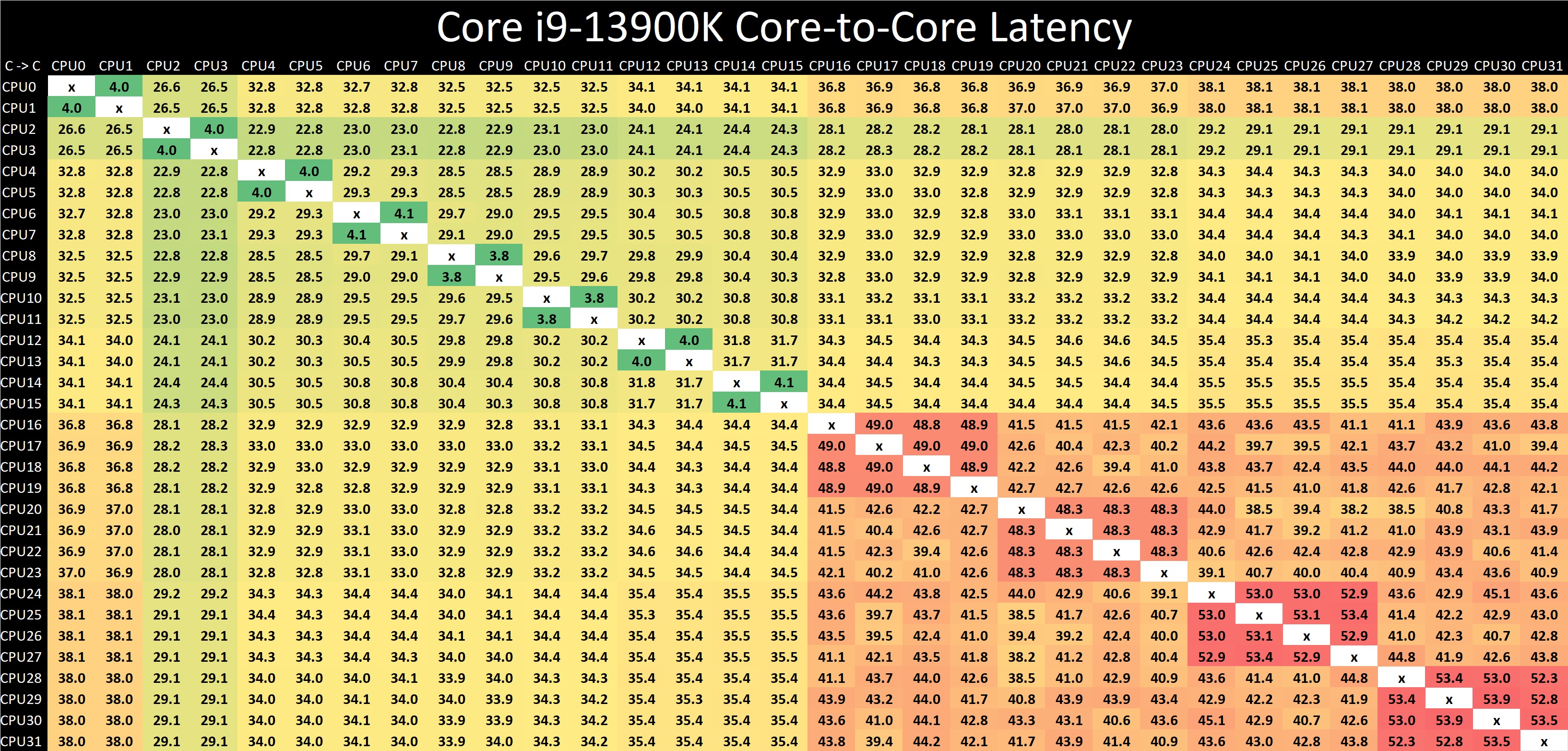
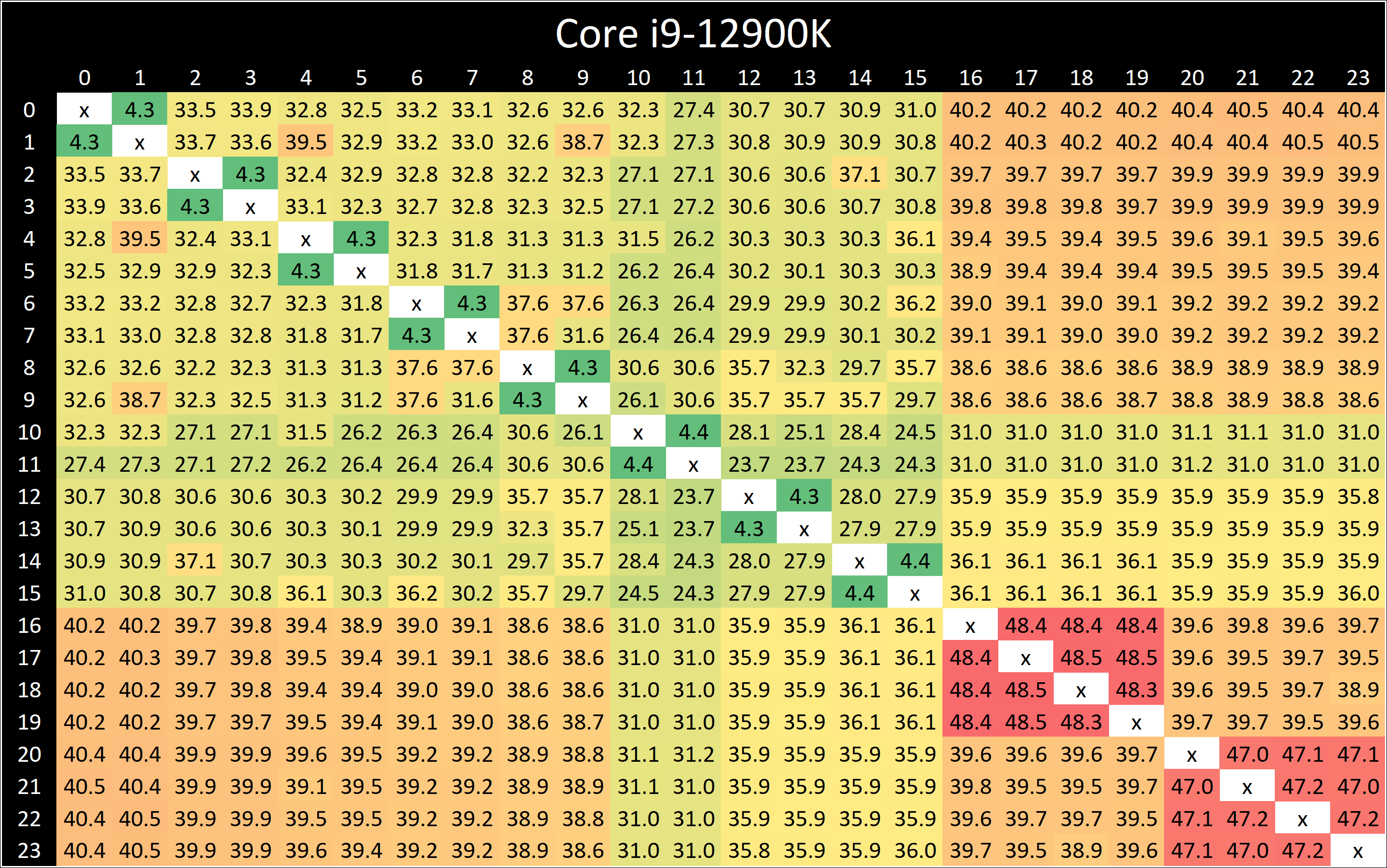
E-cores as a concept are fine. The problem is that the current e-core implementations all suck. Alder/Raptor lake awkwardly bolted e-cores onto the existing ring/cache structure and they're 1.5x the latency of any other core in the system, and actually the latency is even higher inside the e-core "CCX"/4-core cluster (possibly implying they might be having to look through the P-core cache hierarchy or something).
(I haven't seen results, but, I am guessing N100/N300 processors have better latency than this, and this is purely an artifact of alder lake still being kind of a shitty implementation from a bunch of teams that are flailing... it just looks good because the p-cores are good, but the rest of the product is shit.)
Similarly, Apple's e-cores are really intended for background workers in phones, not interactive tasks, and not batch processing an intensive workload.
AMD's e-cores are literally just slightly lower-clocking/lower-cache/4-core-CCX versions of the normal cores, so, there shouldn't be this cliff. Being inside an e-core CCX should be the same as being on a non-big.little processor entirely, other than going back to a multi-CCX model and having a bit lower performance.
Similarly, in the long term, Intel is supposedly looking at something they call "royal cores"/"rentable units" where it's actually (eg) 3x little/1x big core in the same cluster, or some of the units can be paired together to work faster as a single execution stream. So you don't have the latency of flinging a work item all the way to some other stop on the ringbus, because the e-cores are right there and work in the same cache hierarchy/etc.
There is some iceberg-work there in terms of making the scheduling play nicely. But oh look, they've been working towards exactly that with the Intel Thread Director (tm) stuff. Everyone thought it was hideously overwrought for just some basic big.little design... and it is. But when you are scheduling 4 threads onto a core and 1 of them goes fast, the CPU itself will need to make the determination. This will actually vary over time too - sometimes you will have threads on the e-cores while you wait for memory access, etc, but then when they're ready they will burst on the p-cores and churn through their work, and go back to the e-cores.
(in a way you can argue this is the same vision that xeon phi was built for... xeon phi looks like a processor built for a world of intensive AVX-512 work segments, stitched together with highly-threadable low-performance IO segments/other work. Knight's Landing basically Silverton (e-cores) with SMT4 added (to an e-core, yes) and you get 72 of them, and the bulk of your work is happening in the AVX-512 parts stitched together by these scalar SMT4 threads. Well, Royal Cores are the same idea but with regular scalar code - put the hard parts in the p-cores and the easy parts in the e-cores, and run enough work to saturate it.)
But everyone is fishing at this same "p-cores churn through the hot thread and emit bulk work items, e-cores handle the bulk work out of a queue or something" model and that's just not tenable when the e-cores have this massive latency hit/etc. It's not that "e-cores are shit for games" it's that "having half of your processor have twice the latency and exist in a separate cache partition is shit for games"... same reason multi-CCD AMD chips don't do well in games.
So maybe I just have overly rose-colored glasses about the e-core latency, maybe the latency is just ass.
Also, rustup, with visual studio forcing dx11 install or whatever, while doing windows updates, is just the best on a 120gb Liteon sata SSD pull with 4GB of memory on a J5005 lol. Can't even optane that shit to make it go faster because it doesn't have a m.2 lol
Area. Golden Cove (12-series) and Raptor Cove (13-series, except for some of the lower SKUs which get rebranded Golden Cove) are obscenely massive. It is something close to 2x the area of zen3 per core, which is not even on a 5nm tier node like Intel 7! and logic density went up 1.8x between TSMC N7 and N5, so this means something like 3.2x the transistor count at the high end. Achieved shrink will be a bit lower, but let's say 3x the transistor count of zen3.
And probably this tends to understate things because that's Golden not Raptor cove. Intel went obscenely huge on caches with Raptor Cove too - they did the same thing as NVIDIA with Ada, and dumped an assload of L1/L2 cache on it too. I don't know off the top of my head but let's say 10-20% bigger for Raptor cores.
In contrast Gracemont is much smaller - it is not quite "4x" as advertised, 4 is actually the number of cores in a Gracemont CCX/cluster, but the cluster is somewhat bigger than a Golden Cove core. So the actual core area is 3.26 Gracemont cores per Golden Cove core, and again, Raptor Cove is significantly bigger.
--
So the tradeoff is like - they could have done a 12P0E or something like that, for about the same area as a 8P12E. Which would still lose to a 16P0E Zen3 in multithreaded workloads, most likely.
That's the game Intel is playing - 8P is generally enough for games, but it's area-inefficient to keep scaling like that. But you have these other bulk tasks that just like tons of cores and don't care about peak performance, so, you have a mix of both. The E-cores give you more perf/area and the p-cores give you more peak perf for games/etc. So theoretically it's the best of both worlds, it's not as slow as a full e-core chip would be but it has a lot more MT performance than an all-P-core would.
Unspoken underlying problem being that Intel's P-cores are much, much, much bigger than the competition. Hence they have a much greater need to come up with a "compact" alternative than AMD does. Using that 1.8x logic scaling factor (which is optimistic), a Zen3-on-5nm design would be 1.72mm2 which is just about the same size as Gracemont. So Intel's "e-core" is about as big as AMD's p-core! Hence why they are much more focused on a whole new core design, where AMD just densifies the existing one (high efficiency/high-density libraries, reduced cache, back to 4-core CCX, etc). Squeeze that last 30% and call it a day.
On a more tactical level, I think it also is a move to force people to use Gracemont and start writing code for it. Long-term, your P-core being 3x the size of your competitors' is not sustainable and they need to pivot away from the existing P-core design (lakes/coves), it obviously is just a mess internally from 3 decades of tech-debt. Nobody really cares about the atom chips, despite them being pretty good for a long time now (my J5005 NUC made a great thin client during the pandemic, I use them for HTPCs, etc). Well, now you have to care, or you're leaving performance on the table on the mainstream intel chips. It's not just "intel loves big.little" or "needs big.little for area" but also "big.little" is a way for them to start getting the "little" cores into running real-world code, because in the long term they need to kill the coves off (and perhaps replace them with a mont-derived alternative).
(my suspicion is that this is a case of Conway's Law in action, and the architecture of the Lake/Cove family resemble the Intel organizational chart, and since Intel is a giant knot, that's the processor architecture they produce, and they've been doing that for at least 20 years. In hindsight Pentium 4 was the warning sign of the internal rot, they got it back together for a while but after the sandy bridge era they collapsed and everything since then is probably just more and more tech debt and kludges stacked on.)
--
Also, frankly, the e-core's "CCX" design makes sense. Tiering your interconnect/cache is what AMD has done very successfully - you have 2 CCXs per CCD (on zen2), 8 CCDs per socket. And that lets them decompose the interconnects into manageable pieces - 4 cores per CCX is a simple all-connected topology. Those talk to 4 quadrants on the IO die, which is a simple topology. If you want to talk to the other CCX, you have to go through the quadrant/IO die, so there is no "special case" there. It's all just a composition of simple pieces.
Ringbuses get annoying/inefficient past about 10-12 cores, which is why Intel abandoned them in server after broadwell-EP (with its "dual ring" design). But a mesh of individual cores also has this huge latency penalty, and consumes a bunch more area, and (in practical configurations) still tends to be very bottlenecked unless you spend an even higher amount of area on it.
What's the middle-ground? You group the cores into clusters/CCXs and you either have a mesh-of-CCX or a ring-of-CCX or some other tiered structure. And you can break the "tile" idea down into tiers too - a tile is a ring or mesh of cores, and then you have a mesh of tiles, but these are separate logical tiers and don't need to interact.
It is the usual HPC networking problem - connecting 1,2, or 4 nodes is easy, with simple all-connected or hypercube topologies, with a small number of links. A hypercube requires only 2 links per node for 4 nodes. An all-connected topology requires only 3 links. And you can solve for modestly higher numbers with something like a ringbus (which gets a lot of flak but it's an extremely performant network structure, and AMD uses them too for their 8-core CCX). But that falls apart with higher numbers of nodes too, and big switched-fabric networking chips or backbone switches are some of the largest and most expensive chips manufactured, a 32-port 400gbe switch (idk, whatever) is gonna be a big beefy boy in itself, that type of thing often hits 750mm2+ of silicon on the latest nodes.
You need something that both scales in terms of network hardware/area/power, and also performs in terms of actual latency and throughput. That's super difficult (and the best topologies are de-facto "tiered" anyway like hypercube or butterfly), so the best strategy is to introduce this tiering. And AMD has meticulously stayed in the limit of "the IO die is a simple hypercube topology of quadrants" and "the CCX is a 4C all-connected or a 8C ringbus", and just composed these simple things together with tiering.
I think low-key Gracemont is important because it's Intel tinkering with the same concept - and they're doing mesh-of-tiles with sapphire rapids too (not sure what topology is inside each tile though). Because they can't have 14+ stops on the ringbus (memory controller, 12 cores, iGPU, etc) and the purist "mesh of single cores" topology obviously didn't work with skylake-SP.
Anyway, I wish they would do all-P-core too, and theoretically that exists, it's Sapphire Rapids, and there is a workstation/HEDT variant, it's just super expensive and has massive power transient problems (you need 500W of headroom, literally, you will crash if you don't have a 1kw+ PSU, they are not kidding about 1300W being the recommended) that might be sending them back to the drawing board for another stepping. And there is also all-e-core chips too, that's Sierra Forest... but it seems like a tentpole customer pulled out (rumored to be facebook iirc) because Bergamo, AMD's compact-core based Epyc server chip, is more attractive. And so they have reduced the scope of Sierra Forest, it now tops out at 2 of the medium chiplets and the big chiplets are canceled entirely (where they planned to use up to 4 of the big ones).
MLID is such an unreliable source that I hesitate to recommend him, I like his content and listen to him a lot, but you really need to understand the broader context of the market/etc to know whether what he's saying makes sense. But he does tend to have some interesting guests who are usually way better than he is, and one of his recent guests was a boutique PC builder who specializes in digital audio workstations (which need to be super low latency/etc). And they talk about Sapphire Rapids workstation and some of the things being discussed around it.
Consider also scihub:9780849337581 for a general overview of architecture approaches in general.
It is funny that we keep reapproaching this "barrel processor" design that the CDC 6600 started so long ago. That "Vector processor + peripheral processor" design is super interesting. Nerds are attracted to this design like moths to a fly - it has been repeated and echoed in Sun Niagara, AMD Bulldozer, Xeon Phi, and now Royal Cores/rentable units/zen4c/5c/etc. We can just make one thing run fast, and have a bunch of workers servicing it, that are simple and slow and cheap, right?
Very interesting source material etc, see how they talked about their own processors. A lot of older systems were exhaustively documented and the info is available now.
Oh, so, I got lost in the appendix explaining network topology, but to circle back on this: yes, yield, and cost. It would be a very large total area too even if it yielded well. Just too expensive in general.
Alder Lake 8P8E: 215.25mm2
Alder Lake 6P0E: 162.75mm2
Raptor Lake 8P16E: 257mm2
For comparison:
8700K: 149.6mm2
9900K: 174mm2
10900K: 206.1mm2
Zen2 CCD: 74mm2
Zen3 CCD: 83.74mm2
That's actually pretty big for a consumer processor already. And it's all in monolithic 5nm(-tier node), which isn't cheap even if it yields fine. So them having a uarch that's at a pretty bad area disadvantage isn't good, and tbh they obviously aren't delivering on any kind of efficiency promise.
Physics is getting hard and wafer costs are spiraling pretty bad, which is why AMD is exploring advanced packaging/etc. Doesn't always work though - like RDNA3. Data movement still seems to be very expensive, although 2.5d and 3d stacking (and direct-bonding) will mitigate this somewhat. But advanced packaging means moving a lot more data, and you have to be careful of what lives on what side of what links. Cache being on the other side of the infinity links (not infinity fabric!) in RDNA3 seems like potentially a specific problem with the design, since you pay the cost for the data movement to the cache and not just the data movement for the memory.
I think you're right they probably could do it if they wanted etc, maybe sell it as a pseudo-HEDT (especially if you can glue together a pair of dies directly to 2x the normal core count - and if you can glue together 2x16C all-P-core designs that's fine for HEDT for a lot of things imo!). But the price would probably be fairly high (16C would be like, probably $700-900) and the power would still be quite high (intel does not win at any power bracket right now even with limits, it's just less bad if you limit it to 150W), etc. Maybe some of the power stuff would go away if you got rid of the split-brain big/little clusters on a ring thing, but, even if you went with 16 P-cores on a ring, the latency would still go up a lot, and you'd notice it because the stuff you want it for is gaming/etc. The latency would hurt gaming IPC a decent chunk imo, or you'd have to go to a double-ring like broadwell.
It's a mess and this is the point where the ringbus scaling craps out, is my point with the latency discussion. It seems hard to have more than about 8C or 12C per "tier". Even Bergamo (AMD's new e-core variant of Epyc) is 16C of Zen4C per CCD, but it's 2 CCXs of 8. Broadwell dual-ringbus is 2 tiers of 12 cores each. The subsequent Intel chips moved to the mesh. Alder/Raptor do 8P+4 e-core clusters (12 nodes). Etc. You can add more tiers of 8-12, but about 8-12 nodes per tier seems to be the limit that scales well due to interconnect bandwidth/etc, just historically imo. Interesting convergence.
(plus a couple nodes for pcie agents and iGPU and memory controller and shit I'm not counting here, not stops just just cores)
I think strategically they want and need to keep selling the e-cores though, it's not what's right for you, it's what's right for them and their migration path. Some of these pieces it's hard to see how you do everything in a single go - it's tough to go from "everything is the same" to "lol CMT with 3 slow/1 fast thread controlled by this thread director that wants to talk to your OS scheduler". But the theoretical end-state of "big.little within a core cluster" or "within a CMT core" is pretty neat at least, that would mitigate the latency problems of dedicated "little core clusters". And this is one of jim keller's ideas apparently, while he was at intel (briefly, lol)
Now again, to say something nice here: the p-cores are pure out-of-order monsters. Very wide decode units, lots of execution resources, etc. It is the same as the "zen4 vs zen4-X3D" split, stuff that prefers zen4 over x3d also really prefers raptor cove, it's an execution monster and it does it all on just 8 p-cores. it just also uses more energy to do it, and cache can handle some other situations where the working set helps cover some useful working set. And the e-cores do give you a ton of the performance equivalence of having a wider AMD processor in MT workloads (if they're not latency-sensitive, ie cinebench and video encoding), just not at particularly great power compared to AMD's 16 p-cores clocked much lower.
I like my Atom processors a lot (and I've looked seriously at denverton etc). They're not bad cores at all, but Alder/Raptor just put them in the worst possible place, with too much voltage (no DLVR!), meaning you might as well goose the whole thing and go for power etc, and the latency isn't flattering.
I would have loved the idea of Sierra Forest-HEDT with like 192 / 256 cores (or whatever specifics) enabled or whatever, if they could get that to a relevant price for enthusiasts it'd be amazing, the HEDT market is super dead and the e-cores are good enough nowadays. That would be a super high-value place to put a product, if it's not moving adequately in the server market etc. Give me 5820K level value for something the client platform cannot do, and Intel benefits from actually getting a foothold on a market that is willing to tinker and build stuff.
But everything intel does has come so late that it almost doesn't matter, it's a sidegrade at best, at much worse efficiency etc. Just buy a 7700X or 7800X3D or 7950X/X3D. Let alone the slaughter in the server market etc. Sapphire Rapids is not great either, lots o weird power shit, and maybe it needs another stepping to fix it? ok, or, if you're a hyperscaler, amd will ship you zen5 samples probably within the next 3 months, and they can actually execute and deliver.
Hard to see that changing anytime soon either, I don't even see green shoots, I think they're in a death spiral tbh. I see the 2.5gbe nic team failing over and over (I225/I226), I see sapphire rapids taking far too many steppings and base die changes, I see DLVR still not working, I see no plan for AVX-512, I am guessing they have continual problems with integration/packaging, I see every product being a one-off with no reusability, etc. They're too important to let go under but they're in deep shit and they have to do a turnaround on an understaffed underpaid employee force etc, while battling deep internal-culture rot and middle-management warfare etc. It's gonna be a while before they're relevant imo.
I, too, have looked at big.little in 12/13th gen laptops and just ehhh is the world ready for that yet? I thought 11th gen was kinda attractive for that reason, the last all-p-core uarch (oh and you get avx512 too, etc). Orrrr you just buy something with a 7940HS/HX/whatever and get 8 big old Zen4 cores... with AVX-512.... and that's every product segment and it's going to get worse, pretty much. Intel still coasts on massive availability but at a technical level AMD is clowning them in pretty much most enthusiast or enterprise use-cases.
(one exception, usually, is system stability. AMD's AM4 USB dropout glitch isn't really fixed despite lots of effort, neither is the AM4/5 fTPM stutter bug, and a physical TPM header is something to look for on an AMD board lol, because fTPM is broken and causes random stutter (TPM operations getting blocked by some single-threaded UEFI process in vendors' UEFI implementation, is the internet speculation). Intel mostly is better about not having that shit, for now. In the past I have heard of a lot of problems with AMD chips in servers too, just weird linux problems etc, (and of course segfault affected a lot of early Zen1/1000-series chips in a lot of things, the scope was downplayed p. bad), but that's scandalous hearsay and tbh today I think Asrock X570D4U-2T or ROMED8-2T or GENOAD8X-2T owners etc are happy, people would report problems etc. Intel does have the support story of being the default... right up until they won't anymore.)
They have some neat ideas but AMD is gonna leap forward again with Zen5 too, everyone has neat ideas that will be coming to fruition in 3-5 years. Zen4 was the easy stuff - a pretty minor port of zen3 to 5nm, with DDR5, with AVX-512, and some tweaks to open up architectural or timing bottlenecks to push clocks etc, while they did the DDR5 switchover stuff. Some cleanup (and they got it pretty much to 6 GHz in peak 1T lol) but all the interesting stuff is coming next year in zen5, it's gonna be much wider etc (similar to intel's own width increase with golden) etc, it's expected to be a pretty significant increase. this is a big rework of the whole thing to clean up and scale higher. so this 14th-gen stuff will be going up against zen5 being probably 20-30% faster in general performance, it'll be a pretty decent uplift. They're in trouble in pretty much every product segment already, it really seems like they struggle to even get the product out the door these days.
(just wanted to call out: wikichip is a lovely site, lots of randomly useful information there. and wikipedia also has a number of useful lists of cpus/gpus/mobile SOCs/etc with characteristics listed, and good sources for CUDA compute capability etc. Don't sleep on wikipedia as a quick reference for what the boost is on random xeon sku xyz, and so on.)
Editor's note: DLVR seems to be working. MLID points out that the (same core config, 2% higher clocked) 14600K pretty consistently pulls 30W less than the 13600K, in HUB's benchmarks. The performance results are margin-of-error.
That's a pretty big gain for better yield/tighter undervolting over time, that's a large chunk of the processor's power consumption (which HUB does not bench separately). I'm waiting to see the meta-reviews come out but that's tentatively interesting.
I totally bet they did get DLVR working and just immediately spent it all on higher clocks and a few more cores in key segments to stay ahead of AMD in the "top" segments (or, the benefits of the stepdown are minimal when you're clocking very high). It looks like another 12900K/13900K where the top SKU is just clocked beyond all insanity but if you set a normal power limit it's fine. Actually substantially better than 12th/13th gen in efficiency, at iso clock/cores.
DLVR is the continuation of the FIVR technology from Skylake-SP. I know I've read some good discussion on the topic recently but I don't remember the specific trajectory of the tech. But Alder Lake was supposed to reintroduce it (confirmed in BIOS options left in early Asus bios) and Raptor Lake was supposed to introduce it again... third time's the charm, seemingly.
It just also does not really matter because AMD is making progress too. These 14th-gen will have to go up against Zen5 next year, even if Meteor Lake does get into socketed chips at some point (which will be a new socket, lol) it's gonna be in a much different competitive atmosphere.
Strix and Strix Halo should be sick and should be very legit Apple Silicon competitors, for extreme enthusiast workstation laptops etc with socketed dual/quad configurations to 512GB/1TB respectively, or more, and big caches, with AI accelerators etc.
Intel needs to get products consistently working and consistently out on time. It's not that their products are awful, per se, but Meteor Lake is going to be perceived way differently coming after Zen5 launches etc. Server Zen5 will not be that many quarters away. Etc. The 2.5gbe still has problems after like 6 public steppings. Etc. There clearly are still problems in execution.
In derbauer's test, he got a performance difference of 2.5% between 200W and 400W (the review sample he got didn't set any power limits whatsoever by default) on Cinebench.
To be fair, the 11xxx series was pretty brazen. If I remember correctly, they literally regressed in many benchmarks. At least this is just functionally identical.
Clearly, the correct move is to buy 13th gen parts at their current street prices; or maybe Ryzen depending on what your priorities are. The only good news is that it's hard to go too wrong in this era; I've had great success with CPU upgrades and new boxen in the past few years on both sides of the aisle.
I'm looking to snag the Microcenter Ryzen 7700X bundle the next time I'm in Chicago. Intel dominates stuff like Cinebench but that's not what I use my computer for. The Ryzens are very competitive in gaming at a fraction of the power draw and any of them are leagues ahead of my current i9-9900K in both single and multithreaded performance so I'd get a great uplift without heating up my office.
I find it amusing that my absolute best intel desktop chip you could buy in 2019 would now be considered a low power chip with it's 95W TDP.
MicroCenter also has a deal on and off (mainly keeps switching motherboards) for an Intel 12900k bundle with motherboard and 32 GB of DDR5 RAM for $400. It may not be the absolute best for raw gaming, but damn, that is a pretty good deal.
I don't know how good of a value the 7700X bundle is, but my problem is I always want more cores because I am usually compiling code. I loved the 5950X, a very fast and power efficient CPU, so my likely upgrade path is probably the 7950X or TR or whatever CPU takes the "productivity" crown next. And hopefully, by the time I'm in the market again, MicroCenter will have another unreasonably good deal available.
Personally I'd much rather use a 7700x to not have to deal with asymmetrical cores. They perform close enough otherwise, I think with the 12900k having a minor edge in some tasks, including acting as a space heater.
Also, 7700x buyers can expect CPU upgrades for a generation or two on the same motherboard. Intel's 14000 series (13000 part 2) is the end of the line CPU upgrade for the 12000 buyers.
Yeah, I learned that lesson the hard way buying a 9th gen Intel chip and having literally zero upgrade path on the same board.
My plan is to get the 7700X bundle, which for $400 with board and 32GB DDR5 is a steal, then when AM5 is replaced get a new CPU from the final generation.
Funny aside, we seem to have followed a similar upgrade path. Going back 1 further, mine was:
Intel 2500k -> Intel 9700k -> AMD 7700x, with intent to get an AMD 8800X3D or something later, as it becomes available.
I have an Optiplex with an i7-2600 and 1050 Ti in the basement. We use it to Parsec games onto my wife's laptop when she (rarely) gets the itch to join in with our boys playing games.
Was the 9700K -> 7700X upgrade a nice jump? I've been running MSI afterburner and keeping an eye on GPU usage and am often only using ~80% while well under my monitor's FPS limit. It doesn't show any CPU cores pegged but I assume that's my bottleneck.
Also hurts that Intel changes socket every 5 min. I sold everything before a move and I’m looking to get a pc again. I’m looking at the used market to see if I can get a good deal and I’m surprised that the same motherboard generation I sold (Ryzen 3600) supports a 5800 that runs pretty decently today. I guess it was a good buy back in 2018.
I think if I buy new I’ll go ddr5, otherwise I’ll stick with whatever is around. But people in the bay are trying to pay rent with their PCs and want way too much for the age of components they have. Back on the east coast the same pcs go for 200 less at least. Makes negotiation a bit difficult.
Isn't domestic postage in the USA incredibly cheap? Would it be realistic to buy components from the east coast and ship them west?
This is normal in Australia, but that's due to the size of the country and the sparse population in some areas. Our prices are a rip-off equally everywhere: https://en.wikipedia.org/wiki/Australia_Tax
I, too, am currently rocking a 9XXX series chip, and currently debating whether I should spring for a 7800x3d or wait a bit and see what the next gen of Ryzen's will offer.
funny thing is the 9900k was criticized pretty harshly at the time for its power consumption. expectations around power consumption have really changed over the last few years.
do those footnotes include your software crashing from an unknown opcode when it gets automatically moved to the e-cores while executing vector instructions ?
So far, AMD doesn't do the p-core/e-core thing. All cores will have the same ISA. They have talked about a "compact" core which seems to be a tweaked process that shrinks the core and decreases peak clocks a bit, meant to cram more cores into one chip. If CPU designs were like software, you might think of this a bit like someone choosing compiler flags to optimize for size instead of absolute speed, but still compiling the same sources.
I'm not sure what footnotes the earlier poster meant. One might be that the AMD model numbering is a bit obscure. You need to look closely that you are getting a Zen 4 core in your Ryzen, with the same model line mixing different CPU and GPU architectures in different models. I don't know if there are programmer-visible differences in what AVX-512 means to AMD vs Intel...
No, AMD doesn't have E-Cores right now, but even when they do it won't ever crash: they have Zen4 as their P-Core and Zen4c as their E-Core. Both support exactly the same extensions.
Issues that only go away with disabled power efficient cores beg to differ. People assume that if its 3rd in a row generation of hardware released then software support issues were ironed out before.
I don't know what software is problematic since it has yet to bite me, but hell, in that case, you can at least go Ryzen. While it's a bummer that there are basically only two high-end CPU vendors for the desktop, at least we're still spoiled for choice among their lineups, with plenty of different motherboard and CPU options. My main desktop box is Ryzen and it works great.
GN is great and cuts through a lot of the tech bs. I don’t watch much tech news or worry about what gen or nm process node we’re on anymore but from time to time I get GN in my YouTube recommendations and it’s always a good watch.
As an _addendum_ for those who are not as up to date on news: The 14th generation is a split-architecture for Desktop & Mobile. The 14th Gen _mobile_ processors (being released in December) should be on Meteor Lake, and there is expected to be performance differences.
Anything older than 8th Gen Intel processor won't run Windows 11 without some hacking. Sure, Windows 11 isn't all that well liked, but it's not a good idea to buy a system that won't even run the newest OS. You're going to be out of support before you know it. 8th gen processors were released in 2018.
Also, a ten year old system is likely to have a spinning hard disk instead of an SSD. Spinning hard disks are frustratingly slow.
Also, before the 8th gen release, you couldn't even easily find a 14 inch or smaller laptop with a 4-core CPU because of the cooling requirements. I think a 4 core processor is becoming somewhat of a necessity these days.
The 6th gen laptop darling was the i5-6200U which has 4 thread (dual core) CPU. I have an Asus Zenbook with one of those and unless I want to compile a kernel in a hurry it's still perfectly functional for all tasks. You can get the same CPU in a second hand ThinkPad X1 Carbon for well under US$200 these days.
I'd probably draw the line at Sandy Bridge (2nd gen) as they're the first with AVC and VC1 video decode. Haswell (4th gen) adds come VP8/VP9 decode on Linux. H265 doesn't arrive until 7th or 8th gen (but if you're building a TV box for that, get a Pi 4 which does it perfectly at 4K).
I would back that up. You want something that runs Windows 11 just because it will make your life easier since Windows 10 isn't getting any new feature updates.
But anything at all that runs Windows 11 will almost certainly do you fine. Just make sure it has at least 8GB of RAM. That is the minimum I would use Windows 11 with. And an SSD.
I'm working on an old 2012 Lenovo here that I put 16GB RAM and an SSD in and I'm editing 4K video. It's not quick, but it will do it. Certainly works with me having literally 200 tabs open in Chrome, Visual Studio, Photoshop etc.
Something else is going on there. I did that to a friend's laptop that was running epic slow for no reason, about the same age. I never had a chance to get to the bottom of it as it was lost in a fire, but there is something causing a hang-up.
I have a 6 year old 7th gen i5 laptop here with 16GB + SSD in it and it is smooth as butter with stock Windows 10 and about a billion things going on. I have it running two screens and I use it for editing 4K video, doing livestreaming etc. In fact, I have a second identical one with only 8GB in it and it is perfectly fine as long as it doesn't go to swap.
The SSD I put in is a $10 job from Amazon.
I wonder how to get some sort of system-wide profiler that will show where the hang-up is?
I think it has to do with working off of an SD card. My onedrive (with documents, desktop, pictures, video) are file on demand on sd. I am 80% sure that is the case.
I have an 11700K and a 3070ti. Both of these were panned by GN and others as somehow pointless. Somehow I'm happily running here, fast and stable with everything I throw at it. You can safely ignore the youtuberati's views on what should or should not exist.
This i7-14700K has bumped frequencies, added E cores and increased "Smart Cache" (3MB) and total L2 cache (4MB) and uses the existing socket. It's a fine refresh product that will do what it says on the tin for years, and given that it is a refresh of an existing, mature product, it will do so with the least possible friction.
> The only major difference so far is that these chips by default don't have the typical power limit set, so they can actually achieve about +2-3% more performance in gaming at +100% more power draw.
I heard that Intel might have gotten their Digital Linear Voltage Regulator working which would decrease power consumption. It was disabled in 13th gen because it was broken.
I got 10th gen i5 on sale just before 11th gen came out. Works great for my gaming pc. Haven't felt the need to upgrade even when 12th gen went on sale for similar price I paid for 10th. So who are they targeting by launching barely improved chips? Anyone with a decent pc won't upgrade unless there is something substantial and hyped about it.
AMD has its fair share of blunders, they are surely hasty and have struggled to put out good products until relatively recently. But, I actually don't think they have, any time recently, released a literally identical CPU lineup as if it is a new generation of CPUs. The 14th gen Intel is interesting because it's actually really the same processor. Not just stagnation, but literally not a new lineup of CPUs. Intel did do this a few times before, but at least we know why (rest in peace, 14nm++++++.)
AMD has never done that for an entire lineup, but AMD has released plenty of rebadges sprinkled through their mobile lineup - arguably even worse for the unsuspecting buyers. This is why as annoying as their new mobile naming strategy is (like 7840 with the 4 standing for generation) is actually an improvement.
For example, AMD mobile 5XXX series contained a mix of Zen 2 and Zen 3 parts. For example, the 5500U is a Zen 2 part (but the 5500H is Zen 3). The 5700U is Zen 2 (but the 5600U and 5800U is Zen 3).
This isn't to defend Intel - this launch is pretty bleh.
It's not a whole lineup but a bunch of processor not easily identified from the type name are of the previous generation.
For the current mobile 7000 series there is a mix of zen4 and zen3+ that confuses consumers and I think is worse than just releasing the same CPUs with a different number. For example
They're merely rebranded Intel Core 13th Gen chips, with a performance difference around 1% at the same clock frequency. Reviewers found their CPUIDs report the same model and even stepping. Some rumors previously claimed possible minor improvements to the on-die memory controller or voltage regulation, but both turned out to be false. The only differences are slightly increased clock frequencies, and also slightly increased L2 and L3 cache sizes in some lower-end SKUs (that were already physically present on the silicon but previously fused off in cheaper models). Thus, think of them as some new SKUs in the 13th Gen product line with slightly higher specs at the same MSRP (but may or may not be cheaper at retail prices).
Apparently the reason is that Intel was experiencing production difficulties on Meteor Lake, so this new generation is skipped for desktops in favor of an exclusive launch for mobile (and HTPC desktops) platforms. Wait until December 14th, 2023 for the real new CPUs.
Wait for Intel Lake Michigan, which freezes in winter and stays relatively cool in summer. I jest, but I don’t understand how they’re getting power regulation so hit-and-miss.
Intel's 10 nm process node was ill-fated, leading to the "14 nm++++" jokes. But at least Intel finally overcame the problems and delivered 10 nm Enhanced SuperFin (now branded Intel 7) in 12th and 13th Gen CPUs with competitive performance. The upcoming mobile-only Meteor Lake uses the new Intel 4 process node, which seems to start having production problems again. But Intel said they're fairly confident that they'll soon announce Arrow Lake CPUs at the end of 2024 using the next Intel 20A process node - in other words, moving across three process nodes in three years. Good luck Intel.
The power draw on these compared to AMD feels absolutely bizarre - in an age where we're supposed to be trying to conserve resources, it feels ridiculously wasteful to burst up to 430W [1] for minor gains. That's over 200W more than the approximately equivalent AMD chip (the 7950X), for practically no performance over it.
On the other hand, I believe idle power usage is generally lower on Intel parts than on AMD parts, which is usually something that is less methodically reviewed and generally far more important than this peak power shenanigans.
(I know it's a joke, but...) Only if your alternative heating was through electric resistive heating. Natural gas heaters and electric heat pumps will both provide 430W heat with less than 430W electricity usage.
Conversely, in climates that don't experience much winter, I'm wondering how feasible it is to either duct the exhaust air directly outside or run long hoses on my radiator and put it outside. Get that hot air out of here!
If only there were some kind of information pump that could convert heat into information and vice versa. Then you could decide which calculations to run depending on whether you want to cool or heat your room. ;-)
CPUs, like smartphones, don't really need an upgrade every year, but the manufacturers feel the need to come up with a new lineup each year, even when the changes are minimal at best and cosmetic at worst. Most desktop CPUs are already very good enough at their job and don't need an upgrade. There are exceptional workloads where CPU speed is a bottleneck, but I think we have run out of easy ways to improve it.
I upgraded from Intel 3570K (a 2012 CPU!) to AMD 5600X two years ago simply because the old motherboard had no M.2 slots and honestly didn't feel any difference in CPU speed.
> CPUs, like smartphones, don't really need an upgrade every year
So don't upgrade, what's your problem?
Releasing new product each year gives an opportunity to upgrade hardware on your own schedule, being sure that the CPU you buy this year will last for a fixed number of years more. There are very few people always living on the bleeding edge, most just buy PCs when they feel necessary. For manufacturers this means steady revenue stream and good supply/demand balance, without shocks when everyone wants to upgrade (see how it goes for game consoles, for example).
most CPU upgrades in my household now only occur either due to 1) missing chipset features that newer games/media want to use, or 2) patches to fix security holes have slowed the thing to a crawl.
On a disconnected PC without specific CPU feature requirements i'd keep the things forever, it hasn't been a 'speed' or 'cores' thing for quite some time it feels.
Cars, like smartphones, don't really need an upgrade every year, but the manufacturers feel the need to come up with a new lineup each year, even when the changes are minimal at best and cosmetic at worst. Most cars are already very good enough at their job and don't need an upgrade.
its not about getting you to upgrade. if you are happy with your current desktop/laptop then don't upgrade. its targeting people who either love to play with the "newest" cpu or people who is looking to upgrade because their desktop/laptop is really old just like car
To simplify this, it's a competitive marketplace, and there's always someone ready to buy. They will look at the available options, and pick the better one (for their needs).
If smartphone, CPU and car companies sit on their butts, their competitors won't, and they'll eat their lunch.
I upgraded from a 2500K (2011 CPU) to a 12400F solely because the motherboard had started to go flaky and wouldn't power on unless it had warmed up. The CPU was fine for what I do but nobody sells new LGA1155 motherboards anymore.
(at least nobody good, I'm aware there are no-name Chinese vendors making new old-socket boards, no thank you)
Just as a heads up, you could have used a PCIe m.2 riser if you had the empty slots for it. You might not be able to directly boot from it with an older BIOS/UEFI, but that is easily workaroundable.
For those that don't know - "Intel 7" is just a rebranding of what they originally called "10nm Enhanced Superfin" and "Intel 4" is a rebranding of what they were originally calling simply "7nm". The process measurements like 10nm, 7nm, etc. long ago stopped referring to any physical measurements, but now it seems the numbers in the names themselves don't even relate to the fake marketing names used for the process nodes. So Intel 4 refers to a 7nm node (not 4/5) in which nothing is actually 7nm.
The "nm" hasn't meant anything physical for a long while. However, Intel's 14nm was generally comparable not to TSMC's 14nm but TSMC's 10nm, and Intel's 10nm to TSMC's 7nm. When Intel was running two nodes ahead, this naming disparity wasn't a marketing issue, because Intel 14nm (=TSMC 10nm) was still competing with TSMC 22nm. After Intel face-planted, it became a liability, so the nodes were renamed to match industry expectations.
I'm surprised to learn that "nm" doesn't really mean a thing to any manufacturer. At this rate, they'll be in the negatives if they want to keep going like this.
Intel 4, which will be a very short-lived node that is likely to be used for a single Intel product, i.e. Meteor Lake, is advertised as being the first Intel process that uses EUV.
The next Intel products, i.e. the server CPUs Sierra Forest and Granite Rapids, which will be launched in 2024, will use the Intel 3 CMOS process.
Like also when they have launched their 14 nm and 10 nm (a.k.a. Intel 7) processes, Intel has difficulties in obtaining on the new process clock frequencies as high as in their previous mature process, which is why they had to use Raptor Lake Refresh for desktops and restrict Meteor Lake to laptops (like when 10-nm Ice Lake was paired with 14-nm Comet Lake).
With the previous 14 nm and 10 nm processes, eventually Intel has succeeded to reach very high clock frequencies after many years of tuning and tweaking the processes.
With Intel 4 they will not have the opportunity to do the same, because they will pass immediately to another process node, since that is their only chance to recover a part of the advance that TSMC has over them.
At this rate, SMIC with its ex-TSMC employees and stolen IP is going to surpass them pretty quickly. That's unfortunate, as we could really use a leading-edge fab that is separate from the volatile political relations in East Asia.
power quality is a factor counting against snowier regions. like there was an intel plant manager on here at one point who commented that they regularly traced individual spikes/surges to specific trees taking grid zones down etc.
Columbus is an interesting choice for intel given that it does experience some winter.
Personally I'd say something like WV does seem like a pretty good choice especially if you could get hydro power, it's very very stable especially if you could get a dedicated circuit to the dam with a dedicated turbine or two following your power needs. Age-old tradition for large projects, hydro is a very controllable stable bulk power source. On the downside, big winter snowstorms/etc, mountain weather is intense etc and tbh any blasting might be problematic at these scales. geological stability is already a concern for fab quality, actual mining ops in the area might be problematic.
(I wonder if fracking in some areas would be problematic as well. this could easily be a "bolted into bedrock" type thing. well, bedrock may have some thumping in the midwest too.)
They really optimize for total disaster rate overall, modulo tax breaks and operating costs etc. Winter is a big downside, arizona doesn't have weather other than "hot" afaik. water can be "solved". just take it from farmers.
They are cheap. I bought an Asus Zenbook 14 OLED for $699. It has 14 inch 120 Hz OLED screen, 16 thread Intel i7. Solid build quality throughout. Metal exterior, very good keyboard and trackpad.
It doesn't have a discrete GPU, but I don't game on it, so it is not needed.
You can play games on Intel HD graphics. Even my 8th gen NUC does Vulkan and runs plenty of games just fine. At least the crap old games and emulators I want to play.
The most recent of those were 5W TDP "Amber Lake" CPUs from 5 years ago. To my recollection, AMD had nothing to offer in that space at that time, and as far as I can find AMD has not ever shipped a 5W mobile SoC with any number of cores (Geode notwithstanding).
Then the background tasks need to run on the performance cores slowing down your main workload.
> Then why pollute the die with these?
That's partially the point - they're much much smaller than P cores physically. So if you can move some non-critical stuff off the P cores at a very low die space cost then that's a win.
...all of which assumes correct & intelligent scheduling which I gather isn't always the case
What you saying makes sense, but I am thinking that this may be false economy. It of course depends on the nature of background tasks, but likely they would have a chance to finish quicker on a performance core than on efficiency core and if main workload depends on those e.g. something generating an event, you still are probably going to get a performance penalty greater than if everything was running on P cores or if main task needs I/O and slow background process is blocking it for longer.
It feels like the "for enthusiasts" branding is really just marketing for those less in the know who want to get something because it's targeted at experts. Somewhat similar to the now-prolific superficial "pro" branding on spec-bump higher tiers of the same "non-pro" products.
"For Enthusiasts" is a calling beacon for those not in the know. "I want to have the best of the best, but don't know what that is" are then duped into buying the latest sales gimmick. Anytime someone says "who" they are targeting, it's not their target audience. They are targeting folks who want to be "who" they are targeting.
There's a lot of discussion of the details in this thread but I don't want people to miss the big picture: No one should buy Intel processors under any circumstances. All Intel processors suck now. Maybe that will change in the future, but if you're buying anything today, buy AMD.
Nobody likes to talk about the insane NPS configuration or the models where some cores have good L3 cache and some don't. These cause real problems which are very difficult to diagnose. I know this because I'm the one solving them for customers. Good luck if you're running a workload affected by the CVE solved in the latest Zen 3/4 microcode update, goodbye HPC cluster investment.
The whole announcement doesn't even mention caches once, when that's one of the defining drivers of performance in games and elsewhere, much more so than turbo boost clock rates, which can't be thermally sustained in games anyway mostly.
Given that these processors are intended for enthusiasts (who presumably want maximum performance), why are they including efficiency cores? Would it not be more beneficial to include a lower amount of higher performing cores?
Thank you for your answer. Presumably due to the lack of context switching and dedicating the entirety of core time to process that isn't high priority?
Not really. ARM servers are quite hard to find (e.g. none at Digitalocean), and ARM builds of common software projects are often missing. The server world overwhelmingly still runs on X86.
For some of us, compiling from source is the ONLY way to do things. If there's a zero day, I'm not going to sit around waiting for someone else to make a binary.
Likewise, simply as a matter of principle, I won't run software that won't seamlessly compile on non-x86 architectures. It's much better that way in the long run.
I run ARM, and I have yet to find anything that won't compile on it, unlike, say, UltraSPARC, PowerPC or Alpha, for which edge cases aren't exceptionally rare.
>For some of us, compiling from source is the ONLY way to do things. If there's a zero day, I'm not going to sit around waiting for someone else to make a binary.
Usually binaries are available at the very similar moment the fix is published
Sure, but sometimes they're not. Those sometimes can be very, very critical. Think of the Red Hat (and others) local privilege escalation, for example: Red Hat released a CVE with vague language and with no clear steps to take. If you ran a server that had lots of users, some of whom might be mischievous, you'd be pissed, because you'd be wondering what the heck to do before one of your mischievous users did something.
Apple had the advantage that heterogenous core setups coincided with a major architecture change, so third parties more or less had to change stuff _anyway_. Also arguably a different culture; your average Windows developer is accustomed to a status quo where you don't really _have_ to change anything; things will basically keep more or less working. Whereas Apple will quite happily break third party apps which don't keep up to date.
You see something similar with HiDPI; within a year or two after Apple introducing HiDPI, it was rare to see third party problems with it, but most third party software never really worked with Microsoft's original attempt, and even their more Apple-like modern one is still quite poorly supported.
(Interestingly, MacOS long had a hidden "smart" form of HiDPI quite similar to the old Windows one; used to show up in John Siracusa's MacOS reviews from long before the first HiDPI Macs. They presumably decided third party developers would struggle with it, and bypassed it for the fairly dumb pixel-doubling thing they use today, though).
Yeah, at time of introduction, Intel would have had a lot more experience of their e-cores than Apple. The e-cores in the M1 were, I believe, net-new and reused later (old Apple Watches just had process-shrunk former phone cores, I think).
They don't mention the process node they're manufacturing this on, but I would assume it's intel 4. Sapphire rapids was the old priority at Intel and that was always run on Intel 4 nodes, so I assume it will be the same here. Hoping intel can get down to their 20A and 18A nodes as fast as possible to finally be competitive with ARM competitors on a performance per watt basis.


The 14700 actually got some new E cores, which actually makes a difference (12 vs the old 8, making a total of 28 instead of 24 cores).
But the 14600 and 14900 are exactly identical to their predecessors, at a higher price.
The only major difference so far is that these chips by default don't have the typical power limit set, so they can actually achieve about +2-3% more performance in gaming at +100% more power draw.
GN famously called the 11700K a "waste of perfectly fine sand", but that description fits the 14600 and 14900 even better.