My struggle with this analysis is that it's trying to reason a solution to a completely valid problem, but leaning on an intrinsically flawed metric (the WCAG contrast ratio).
WCAG 3 is moving to APCA (Advanced Perceptual Contrast Algorithm) which will be much more fair to cases covered in this post. Yes, there'll still be perceptual contrast issues with dark yellow, but I'd wager that the solutions you'll land on when measuring with APCA will be less drastic or visually unappealing.
Wow, that first example is really bad. Comparing the grey-and-black against the white-on-orange, WCAG 2 and APCA differ by a factor of two, and judging by eye it's entirely due to WCAG contrast being incorrect. How do you design a contrast measure and not notice that it's sometimes off by a factor of 2? We had CIELAB in 1976; it will give you reasonable contrast measurements.
Wow finally. My site has white text on a red background for a button. Lighthouse detracts a point for this as it's not "accessible" allegedly. I don't believe this matches reality and I hope this APCA fixes the false metrics. Is there a tool online we can try out APCA with?
The maximum saturation occurs at a different lightness value for each hue. Blue is most saturated when it is dark, and yellow is most saturated when it is light. It is for this reason that some people erroneously describe yellow as being a bright Colour.
To added even further perversity to the mix, there are fewer (perceivable) yellows than there are perceivable greens. Relative perceivable values of hues are readily apparent in the Munsell Colour space, shown here:
I too am a bit surprised. I could never address a problem of color perception without cycling through the relevant HSL values.
As a designer, colour models like RGB, Lab, CMTK and hex are of instruments of application. All well and good, but if you want a colour model that is suitable for thinking about colors with, then HSL (or HSV) is the only option.
As an exercise, I get my students to define the difference between color pairs using HSL. Even high school students can do it. Try that with RGB!
i'm primarily using hsl now (though have long used rgb before that), but have experimented with oklch because of the promise of an even more uniform perceptual color space. the big problem i found with lch & oklch are discontinuities in the valid ranges of lightness and chroma, which functionally dependent on the hue value (from my perspective that hue is the independent variable to set first).
color spaces definitely defy straightforward intuition about them.
I agree that as a practical space HSL is limited. Indeed, HSL was supported in the first two versions of Photoshop, but was abandoned as being too inconsistent. A conversion to and from HSL resulted in a mess. However Photoshop, like all design apps, features an HSL colour picker.
Thanks for introducing me to OKLAB.
> From my perspective that hue is the independent variable to set first
Agreed.
> Color spaces definitely defy straightforward intuition about them.
You are aware of Kuehnis book "Color space and its divisions."? It is a great read on this fascinating subject.
yah, the other neat thing about lab/lch/oklab/oklch is that they're theoretically unbounded, so as our screens get better at reproducing more of the visible spectrum, you just use more extant values rather than switching color spaces (unlike rgb & hsl).
i haven't read that book, but i'll have to check it out!
> Building on the previous rule, a yellow UI element must always be accompanied by some darker-shaded UI elements such as text and icons to articulate its meaning.
This was known long ago--it's called the Rule of Tinctures in heraldry, which says that yellow and white (sometimes rendered as gold and silver) should only appear on red, green, blue or black, and vice versa.
Edit: I realize this might come off as trivializing the author, which I didn't mean to do. I just think it's interesting that different groups have come up with the same rules over time.
It is also misused in color printers which leave a repeating pattern of small yellow dots encoding model, serial number, and so on, so your newly printed money will provide a nice paper trail back to you.
Also, yes, handling of colors and color combinations is a very old topic, just that this knowledge isn't given to us by birth, but through learning. Which means there will always be someone stumbling over this and make another post delving into (some of) the details. As long as it brings others up to speed, I count this as a net win. One can just hope that the history isn't lost entirely eventually ...
The Stripe tool mentionned at the end does draw some inspiration from this, and i would really like for Stripe to open source this tool. I have asked multiple times, to no answer. If someone from Stripe is reading this, please please please make the world better for everyone out there by releasing this tool.
This is a neat article, but it doesn't seem very actionable for a non-designer (from my programmer, non-designer perspective). He even says:
> Unfortunately, there seems to be no satisfactory color palette generator yet capable of fine-tuning and creating themable ramps
Personally, I want some website where I can chuck a color in or pick from a preset list, and it shows me HTML elements pre-styled with suggested color ramp colors (for example input{background:var(--theme-bg-2);}). Then I can see what I'm getting and inspect element to take what I need.
The "dark yellow" here looks greenish/brown only because it is shown against a white background. Against a black background it is a perfectly acceptable yellow.
And this is why UI design standards are 1) so important, and 2) must include exhaustive examples of how UI elements should and should not be used in every context that it's possible for them to occur.
I often encounter this problem in command line programs that seem to assume a dark background (e.g. ls, tmux, vim, git log, silver-searcher, grep). Their yellow fonts are impossible to read on my light background. Every time I reinstall Linux or MacOS on one of my laptops, I have to reconfigure the "yellow" palette in the terminal programs to something resembling dark-orange or brown. Then the problem is navigating the rat's nest of options in the various terminal programs to find the color palette configuration.
Yellow is a real issue for sure. My reaction after many years is to just trust feedback from user testing more than the ratio, because users are seeing the UI in context on real screens, and in the end it's their experience that matters to me, not the calculator.
One challenge I have run into is that certain kinds of accessibility accommodations may only be necessary for a tiny fraction of your user base who have a specific type of vision, motor, or auditory deficiency. Unless you specifically recruit and test with those users the issues may not be revealed by usability tests.
> Unless you specifically recruit and test with those users the issues may not be revealed by usability tests.
And, there's just a little hope they're revealed with math. I have someone that requires 100% contrast, which is the requirement if you want to include the tails of the distribution.
And it also depends on the screen and setting; with a good quality large screen in optimal lightning conditions – such as those used in a test setting – contrast matter less than a poor quality small screen in a not-so-great lightning setting.
The WCAG calculations for contrast are complete rubbish, in my experience they don't reflect reality very well at all. I haven't been able to figure out why though, each of the individual steps looks reasonable.
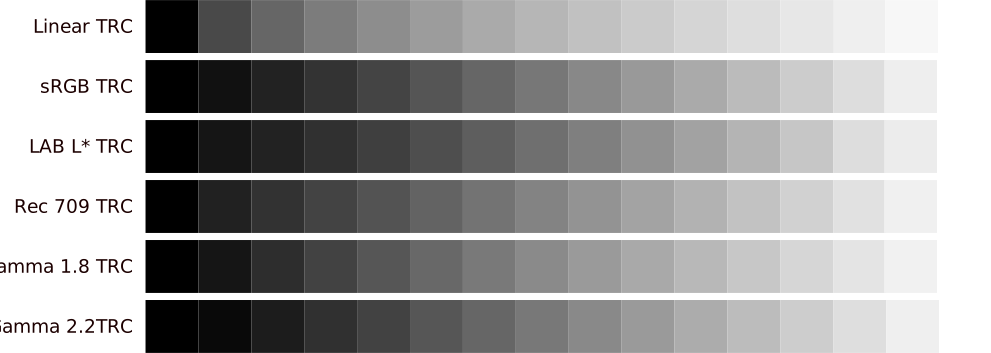
The main issue is that they linearise the sRGB colour space before adding together the components… and then never 'delinearise' it afterwards. Human brightness perception is non-linear and WCAG totally ignores it.
This is a collection of 'even' black-white gradients in different colour spaces.
That 0.150 purple on white is painful to look at, but the .548 yellow on pale grey is mostly fine... and why darken it all the way to the colour of, ahem, an infant's surprise?
The bright yellow color can be used perfectly if the design style wasn't flat. It's incredible how much more legible UI elements can be if you add some shading, gradients, 3d borders, anything!
Really interesting stuff, well-presented. I was a little surprised and disappointed that color-blindness was not mentioned at all (even if to apologize for leaving it out of a complex posting) since for me, with moderate deuteranopia, the “dark yellow”/brown is indistinguishable in practice from darker shades of green and red, unless the color field is very large or I focus on them very closely, and so hopefully would play into decisions on this sort of design system.
This just is one of many examples which show that designing great User Interfaces is (still) more of an art than science, e.g. rigid math based design systems tend to fail in practice.
The issue will definitely still be yellow, and now your design system has to deal with "and do everything a second time, but now for dark mode" because dark mode has a completely different set of equally annoying problems.
The relative luminance will still make the yellow "feel" brighter than the others. In the article, the initial stated goal was to have the colours carry a similar relative level of emphasis.
Isn't that the real problem here? Yellow is evolutionarily a "high emphasis" color. The perceptual color contrast between yellow and black is one of the highest ratios in human vision (more generally, in mammalian vision). It's among the reasons that bumblebees, bananas, dandelions, and yellowjackets co-evolved their colors.
If you don't want the weird perceptual emphasis inversions of yellow, maybe don't use yellow?
The article points out the commonly held reason to use it is the "traffic color patterns", but it is easy to forget that early traffic lights intentionally put the highest emphasis/most "alert" color in the middle, because that is the shortest and most dangerous phase and needs the most attention. Plus, as other comments keep pointing out even modern traffic lights in most countries today think yellow is too strong an emphasis color and have shifted towards amber/orange.
OT, but this seems a place to ask... Has anyone heard of a pedagogically nice color space?
I'm currently kludging - using CAM16UCS within sRGB gamut, but outside, where it gets badly hue nonlinear, I'm "straighten it up a bit" using Jzazbz, slightly fluffing out the visible gamut. And then packaging that as lookup tables.
For pedagogically nice, let's say "looks plausible" and "isn't grossly misleading". So a wide-gamut perceptual space, with large-scale euclidean distances at least eyeball plausible, not-too-dreadful hue linearity, and avoids high-profile space features which are mere model artifact and not perception characteristic. Sort-scale distance is much less important, and computability not at all.
Root-motivation backstory is I'm struggling to find community, around a philosophy of science education content creation, that collaboratively applying vastly greater-than-usual domain expertise is needed to escape current wretchedness. And thought a worked example might help. So web interactives for teaching color, emphasizing spectra and color space, for early primary. Where color is commonly taught, but with content and outcomes notably poor, even by science education standards. I'm still not sure it will gell, but wiggle-3D voxel space with xkcd color names, banana spectra, video cartoon shaders, zooming to physical pixels, et al, has at least been fun. Though low-hanging MVP it so isn't.
Which is probably closer in terms of most western experiences of the primary/secondary colours, but still pretty wrong--just on the other side of what it really is. The light between red and green is almost universally the tertiary (RYB) or quaternary (RGB) colour amber, sitting between yellow and orange =)
As Dutchman myseklf: the official colour as "the traffic light is:" are rood, oranje, and groen (i.e red, orange, and green). As actual colours if you have to pick them from a Dutch colour chart with Dutch colour names tough, they'd be rood, oranje-geel, and blauw-groen (red, orange-yellow, and blue-green). No tertiary or quaternaries for us, we love them hyphenated colours.
As a Dutchman myself, who has stolen his fair share of traffic lights (who hasn't): still only what we call it because of the traffic-light-ness, if you had to write down the actual colour used, or had to point at it on a colour wheel, we'd pick "orange-yellow".


WCAG 3 is moving to APCA (Advanced Perceptual Contrast Algorithm) which will be much more fair to cases covered in this post. Yes, there'll still be perceptual contrast issues with dark yellow, but I'd wager that the solutions you'll land on when measuring with APCA will be less drastic or visually unappealing.
More on APCA: https://typefully.com/u/DanHollick/t/sle13GMW2Brp